Jekyll is the ‘blog aware’ static site generator powering GitHub Pages. It takes Liquid templates, static assets (like CSS and JavaScript), and markdown documents, and outputs a site.
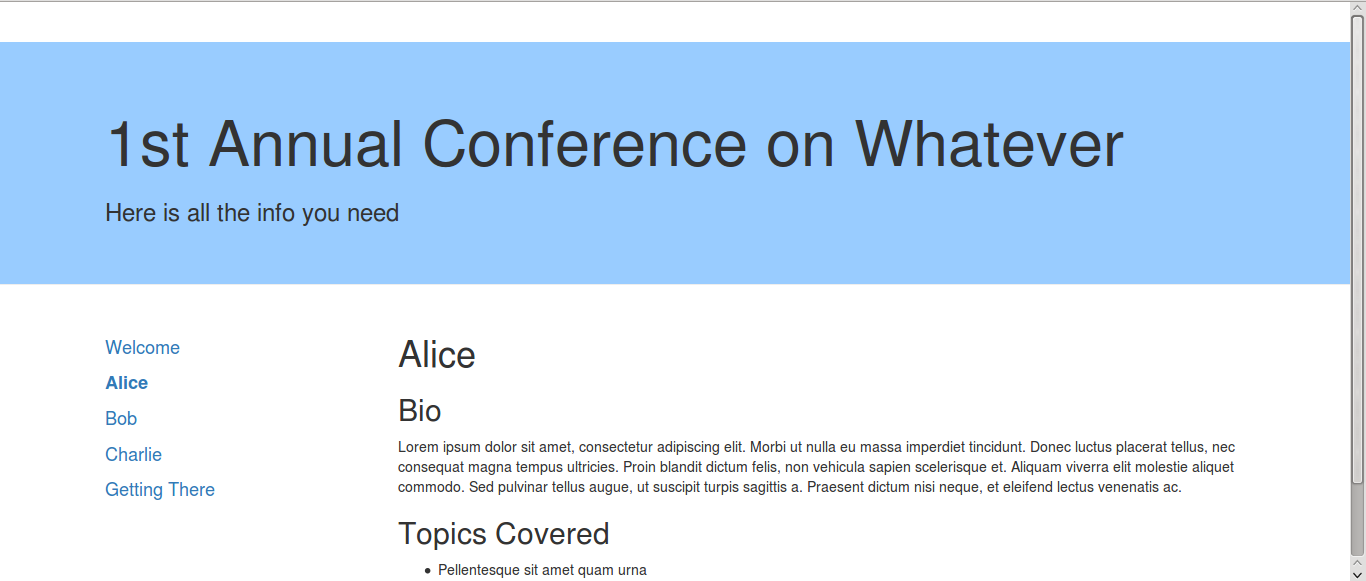
While Jekyll excells at creating blog-centric static sites, its not so clear from the documentation how to create a basic page-centric site. Here is one I created by way of example. It contains information for visitors to a conference on ‘whatever’, including a welcome page, a page for each speaker, and a directions page (source code).
Jekyll folder structure
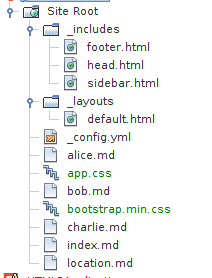
Creating a new Jekyll site can be done by running jekyll new my-site-name, which creates a ready made structure with some sample data that can be immediately viewed using jekyll serve. To keep it as clean as possible, I’ve created a minimal structure by hand instead. At minimum, Jeckyll needs a _config.yml file and a page to serve. I’ve added folers for _layouts and _includes.
Here is the final folder structure containing all the files needed to create the site. Notice there is no mention of posts.
The markdown
Each page on the site is generated from a markdown document (with the .md suffix). Adding a new page to the site is as simple as dropping a new markdown document into the site root and regenerating. Here is the markdown document for the welcome page index.md:
---
title: Welcome
layout: default
menu-order: 10
---
#Welcome to the Conference
Lorem ipsum dolor sit amet, consectetur adipiscing elit. Morbi ut nulla eu massa
imperdiet tincidunt. Donec luctus placerat tellus, nec consequat magna tempus
ultricies. Proin blandit dictum felis, non vehicula sapien scelerisque et. Aliquam
viverra elit molestie aliquet commodo. Sed pulvinar tellus augue, ut suscipit
turpis sagittis a. Praesent dictum nisi neque, et eleifend lectus venenatis ac.
The main part of the document is the content itself, specified in markdown. At the top of the document we have some meta-data in the form of YAML Front Matter stating each pages title, which layout template to use, and a custom menu-order variable which we use to sort the navigation. I’ve decided to go up in 10s because it gives us room to add new pages later without having to edit existing markdown documents.
The template
Because this page has specified layout: default Jekyll knows to look in the _layouts folder for default.html and create the page using this template. default.html is used by all of our pages. It defines the page structure using HTML, Liquid includes, and some CSS classes to make it a little prettier:
<!DOCTYPE html>
<html>
    <head>
    	{% include head.html %}
    </head>
    <body>
        <!--header-->
        <div class="container intro-header">
            <div class="row">
                <div class="col-lg-12">
                    <div class="intro-message">
                        <h1>Welcome to the Conference</h1>
                        <h3>Here is all the info you need</h3>
                    </div>
                </div>
            </div>
        </div>

        <!--main-->
        <div class="container page">
            <div class="row">
                <div class="col-md-3 sidebar">
                    {% include sidebar.html %}
                </div>
                <div class="col-md-9 content">
                     {{ content }}
                </div>
            </div>
        </div>

        <!--footer-->
        <div class="container footer">
            <div class="row">
                <div class="col-md-12 sidebar">
                    {% include footer.html %}
                </div>
            </div>
        </div>

    </body>
</html>
The dynamic page menu
To keep this modular I’ve included the header, footer and sidebar in separate html files in the _includes folder. Jekyll knows to look there for any included files. sidebar.html contains the dynamically generated menu:
<div class="sidebar" id="sidebar">
    <ul class="list-unstyled">
     {% assign pages = site.pages | sort:'menu-order' %}
      {% for p in pages %}
      	{% if p.menu-order %}
            <li>
              <a  {% if p.url == page.url %}class='active'{% endif %} href='{{ p.url }}'>
                {{ p.title }}
              </a>
            </li>
         {% endif %}
       {% endfor %}
    </ul>
</div>
Jekyll contains a list of all the pages it knows about in a site.pages variable. We loop through this displaying a <li> for each page with a menu-order. Whenever a new markdown document is added containing a menu-order value in its YAML Front Matter, it will be included in the site menu.
We can now add other pages to the site, remove, and edit pages via manipulation of the markdown documents.
Why this is good
The benefit of this approach is:
- updating the site now soley revolves around creating new markdown documents and editing existing ones. Should a speaker change, or a new speaker join, we just change the markdown documents, re-generate, and push to GitHub
- there is no HTML to deal with for the document writer, just a standard format that can be picked up in minutes. Having said that, there are slightly more technical hurdles to jump in publishing the updated site compared to users of a CMS like WordPress/Joomla/Drupal
- no need for a big CMS like Wordpress/Joomla/Drupal, and hence
- no security updates
- no management console
- no need to implement a caching strategy (its already static!)
- no usernames and passwords
- the list goes on …
Summary
Jekyll provides a simple/powerful way of generating static sites from markdown documents. The nature of markdown means that it is both secure, and easy for non-developers to use. Combined with Github Pages, its a very convenient way to get a website workflow up and running quickly and for free.