How to implement a rate-limiter using Resilience4j and Spring Boot, and deal with calling it using code and returned headers.
This is another post in a series on Resilience4j with Spring Boot. Resilience4j provides common resilience patterns that can be used with Spring Boot. In this post I am interested in the Rate Limiter pattern.
A rate limiter controls how much work a service is willing to accept within a time window. Instead of letting every caller push unlimited traffic, the service defines a quota and rejects requests once that quota has been used.
This prototype uses two Spring Boot services:
rest-serviceaccepts orders, saves them to Postgres, and calls the email service.email-servicepretends to send order confirmation emails and is protected by a Resilience4j rate limiter.
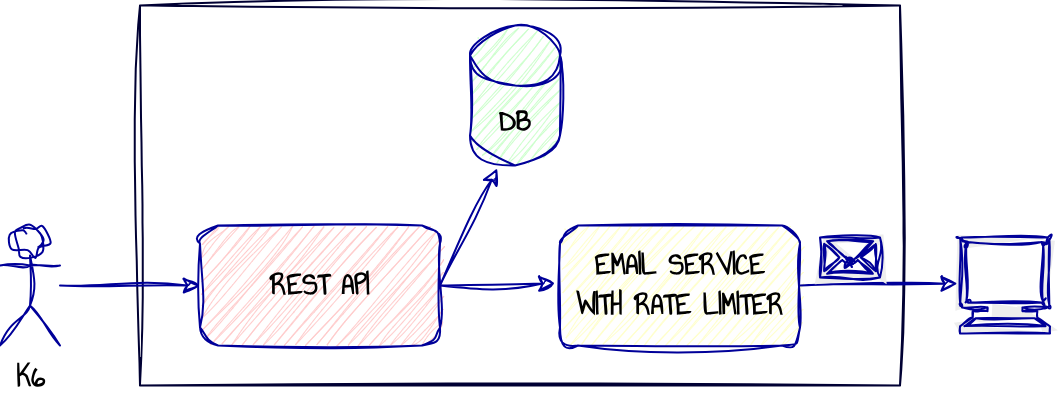
The code can be found here.
Configuration for the rate limiter is in application.yaml:
resilience4j:
  ratelimiter:
    instances:
      emailNotification:
        limit-for-period: 5
        limit-refresh-period: 10s
        timeout-duration: 0
The email service allows 5 email requests every 10 seconds. The timeout-duration is 0, so the email service does not queue or wait for a permit. If no permit is available, the request is rejected immediately.
The Protected Endpoint
The Spring Boot @RateLimiter annotation is added to the email-service endpoint:
@PostMapping("/notifications")
@RateLimiter(name = RATE_LIMIT_NAME, fallbackMethod = "rateLimited")
public ResponseEntity<NotificationResponse> sendNotification(@RequestBody NotificationRequest request) {
    log.info("Sending email to {} for order {}", request.recipientEmail(), request.orderId());
    return ResponseEntity.ok()
            .headers(rateLimitHeaders.asHeaders())
            .body(new NotificationResponse("SENT", "Email sent"));
}
The annotation puts calls to sendNotification behind the emailNotification rate limiter (the same name configured in application.yaml). If a permit is available, the controller method runs immediately and the email service returns 200 OK.
If the quota has been exhausted, Resilience4j calls the fallback method instead:
public ResponseEntity<NotificationResponse> rateLimited(NotificationRequest request, Throwable throwable) {
    log.info("Rate limiting on request from {} for order {}", request.recipientEmail(), request.orderId());
    HttpHeaders headers = rateLimitHeaders.asHeaders();
    headers.add(HttpHeaders.RETRY_AFTER, headers.getFirst("RateLimit-Reset"));
    return ResponseEntity.status(HttpStatus.TOO_MANY_REQUESTS)
            .headers(headers)
            .body(new NotificationResponse("RATE_LIMITED", "Too many notification requests"));
}
The fallback returns 429 Too Many Requests with rate-limit headers:
RateLimit-Limit— the configured quota for the period (5, fromlimit-for-period).RateLimit-Remaining— permits left in the current period, read straight from resilience4j’s ownRateLimiter.getMetrics().getAvailablePermissions().RateLimit-Reset— seconds until the next period starts, so callers know how long to wait.
These follow the field names from the IETF RateLimit header fields draft. email-service sends them on every response, success or 429. On a 429 specifically, the fallback also sets the standard Retry-After header to the same value as RateLimit-Reset, so a generic HTTP client that doesn’t know the RateLimit-* convention still knows how long to back off.
email-service sending the headers on success, not just 429 responses, is what lets rest-service track the budget pre-emptively instead of only reacting to rejections.
The Calling Service
rest-service calls email-service synchronously, using Spring’s blocking RestClient. rest-service remembers the rate-limit budget that email-service last reported. If an earlier response showed the quota exhausted, and the reset window hasn’t passed yet, rest-service skips the call entirely rather than making one it already knows will be rejected — and the notification is marked SKIPPED on the order:
public NotificationOutcome notify(Order order) {
    Instant blockedUntilValue = blockedUntil.get();
    if (blockedUntilValue != null && Instant.now().isBefore(blockedUntilValue)) {
        log.info("Skipping email-service call for order {}: known rate-limited until {}",
                order.getId(), blockedUntilValue);
        return NotificationOutcome.SKIPPED;
    }

    NotificationRequest request = new NotificationRequest(
            order.getId(), order.getCustomerEmail(), order.getProduct(), order.getQuantity());
    try {
        return restClient.post()
                .uri("/notifications")
                .body(request)
                .exchange((req, res) -> {
                    recordRateLimitState(res.getHeaders());
                    HttpStatusCode status = res.getStatusCode();
                    if (status.is2xxSuccessful()) {
                        return NotificationOutcome.SENT;
                    }
                    if (status.value() == HttpStatus.TOO_MANY_REQUESTS.value()) {
                        return NotificationOutcome.RATE_LIMITED;
                    }
                    return NotificationOutcome.FAILED;
                });
    } catch (Exception e) {
        log.warn("Failed to reach email-service for order {}: {}", order.getId(), e.getMessage());
        return NotificationOutcome.FAILED;
    }
}
Otherwise rest-service attempts the call, which can succeed, come back 429, or fail outright (timeout, connection refused, and so on).
The headers from every response are used to update the picture of the budget held by the rest-service:
private void recordRateLimitState(HttpHeaders headers) {
    String remainingHeader = headers.getFirst(HEADER_REMAINING);
    String resetHeader = headers.getFirst(HEADER_RESET);
    if (remainingHeader == null || resetHeader == null) {
        return;
    }
    try {
        int remaining = Integer.parseInt(remainingHeader);
        long resetSeconds = Long.parseLong(resetHeader);
        blockedUntil.set(remaining <= 0 ? Instant.now().plusSeconds(resetSeconds) : null);
    } catch (NumberFormatException e) {
        log.warn("Malformed rate-limit headers from email-service: {}={}, {}={}",
                HEADER_REMAINING, remainingHeader, HEADER_RESET, resetHeader);
    }
}
There’s no retry within the request. A RATE_LIMITED or FAILED outcome is recorded and the response goes back immediately. That’s a deliberate scope choice for this prototype.
Running the System
Start the stack:
docker compose up --build
Run the k6 load test:
k6 run k6/burst-test.js
The k6 test sends more order traffic than the email service can accept immediately.
The logs below are a trimmed excerpt from one run, edited for readability (the test fires concurrent requests from multiple virtual users, so real log interleaving is messier than this).
First, rest-service receives a burst of orders and starts calling email-service. The email-service works fine for the first 5 attempts:
email-service | INFO - ...emailservice.NotificationController  : Sending email to buyer@example.com for order 5
email-service | INFO - ...emailservice.NotificationController  : Sending email to buyer@example.com for order 6
email-service | INFO - ...emailservice.NotificationController  : Sending email to buyer@example.com for order 4
email-service | INFO - ...emailservice.NotificationController  : Sending email to buyer@example.com for order 2
email-service | INFO - ...emailservice.NotificationController  : Sending email to buyer@example.com for order 1
Then rate limits kick in. rest-service knows how long to wait (because of the headers returned by the rate limited request). Any orders received during this time have their email notification skipped, so no call is made to the email-service:
email-service | INFO - ...emailservice.NotificationController  : Rate limiting on request from buyer@example.com for order 3
rest-service  | INFO - ...restservice.EmailNotificationClient  : Skipping email-service call for order 8: known rate-limited until 2026-09-14T13:21:57.873076122Z
rest-service  | INFO - ...restservice.EmailNotificationClient  : Skipping email-service call for order 7: known rate-limited until 2026-09-14T13:21:57.873076122Z
rest-service  | INFO - ...restservice.EmailNotificationClient  : Skipping email-service call for order 10: known rate-limited until 2026-09-14T13:21:57.873076122Z
rest-service  | INFO - ...restservice.EmailNotificationClient  : Skipping email-service call for order 9: known rate-limited until 2026-09-14T13:21:57.873076122Z
rest-service  | INFO - ...restservice.EmailNotificationClient  : Skipping email-service call for order 15: known rate-limited until 2026-09-14T13:21:57.873076122Z
rest-service  | INFO - ...restservice.EmailNotificationClient  : Skipping email-service call for order 14: known rate-limited until 2026-09-14T13:21:57.873076122Z
rest-service  | INFO - ...restservice.EmailNotificationClient  : Skipping email-service call for order 11: known rate-limited until 2026-09-14T13:21:57.873076122Z
rest-service  | INFO - ...restservice.EmailNotificationClient  : Skipping email-service call for order 12: known rate-limited until 2026-09-14T13:21:57.873076122Z
rest-service  | INFO - ...restservice.EmailNotificationClient  : Skipping email-service call for order 13: known rate-limited until 2026-09-14T13:21:57.873076122Z
Once the rate limit has been refreshed, emails start getting sent again:
email-service | INFO - ...emailservice.NotificationController  : Sending email to buyer@example.com for order 16
email-service | INFO - ...emailservice.NotificationController  : Sending email to buyer@example.com for order 21
email-service | INFO - ...emailservice.NotificationController  : Sending email to buyer@example.com for order 17
email-service | INFO - ...emailservice.NotificationController  : Sending email to buyer@example.com for order 19
email-service | INFO - ...emailservice.NotificationController  : Rate limiting on request from buyer@example.com for order 20
Observing the K6 Results
Looking at the k6 results, the expected outcome is a mix of sent emails and rate-limited emails:
 █ THRESHOLDS

    checks
    ✗ 'rate==1.0' rate=90.00%


  █ TOTAL RESULTS

    checks_total.......: 20     101.014687/s
    checks_succeeded...: 90.00% 18 out of 20
    checks_failed......: 10.00% 2 out of 20

    ✓ every order was created (201)
    ✗ wave 1 saw a SENT notification
      ↳  60% — ✓ 3 / ✗ 2
    ✓ wave 1 saw a RATE_LIMITED notification
    ✓ wave 2 saw a SKIPPED notification
Checking the Database
Postgres is useful for checking the final state after the run. We can compare the total number of orders created with the number of confirmation emails actually sent:
docker compose exec postgres psql -U orders -d orders \
  -c "select count(*) as orders_processed, count(*) filter (where notification_outcome = 'SENT') as emails_sent from orders;"
 orders_processed | emails_sent
------------------+-------------
               75 |           5
Clearly, once the email-service request rate exceeds the configured quota, a large proportion of the confirmation emails are not sent.
From the perspective of email-service, however, this is exactly what the rate limiter is intended to achieve. Instead of accepting unlimited traffic and becoming overloaded, the service controls how much work it accepts during each time window.
rest-service also behaves more predictably when calling a rate-limited downstream service. Once it learns that the email quota has been exhausted, it stops making calls that it already knows are likely to fail. This avoids unnecessary network requests and allows the order request to complete without waiting for repeated 429 responses, helping to keep the latency of the order endpoint relatively low.
There is an obvious trade-off here. Protecting the downstream service means some email notifications are skipped. That is acceptable for demonstrating rate-limiting behaviour, but it also exposes some limitations in the design.
Problems
This prototype deliberately keeps save order and send email notification within a single HTTP request flow. That makes the rate-limiting behaviour easy to observe, but it also exposes two important limitations that would need to be addressed in a production system.
First, a potentially slow downstream call should not be allowed to hold a database transaction open. If rest-service waits for email-service while the transaction is active, database connections can remain occupied for far longer than necessary.
Second, the rate-limiting state in this prototype exists only within a single application instance. In a distributed deployment with multiple replicas, each instance will maintain its own independent view of the request quota.
I want to consider both of these problems in (just a little) more detail.
Problem #1: Transaction Boundary Problem
If rest-service waits for the email-service rate limit to become available while the order transaction is still open, those waiting requests continue to hold database connections from the Hikari Connection Pool. Under enough concurrent load, the pool can become exhausted and new requests may fail before they can even start their own transaction:
HikariPool-1 - Connection is not available, request timed out after 30000ms
CannotCreateTransactionException: Could not open JPA EntityManager for transaction
This version avoids that specific failure by splitting the work into two short database transactions:
- Save the order and commit (transaction #1).
- Call
email-serviceoutside the database transaction. - Update the order’s email status (transaction #2).
This keeps database connections out of the rate-limit wait, but introduces a dual-write problem. If the process crashes between these steps then the database state and what actually happened can become inconsistent.
The flow is also still synchronous. The HTTP request thread remains blocked while rest-service waits for email-service. So although this design protects the database connection pool, it does not free the request thread. To avoid holding that thread as well, email delivery would need to move to asynchronous processing.
If email-service is unavailable rather than merely rate limited, the order has already been saved. The email call fails, rest-service records the email status as FAILED, and the API can still return the newly created order. That is better than losing the order entirely, but it does not provide durable email recovery. And imagine it was not a confirmation email we were delivering here, but a (insert important action here).
One way of fixing this is by using a transactional outbox. The order and an email_requested outbox record are written in the same database transaction. A separate process reads the outbox, calls email-service, and marks the message as processed after a successful delivery.
This keeps the database transaction short while also creating a durable record of work that still needs to be completed.
Problem #2: Distributed Rate Limiting
There is another problem once the application is deployed as a distributed system.
If requests can be handled by multiple instances, the rate-limit state must be shared between them if the quota is intended to apply globally.
Resilience4j’s RateLimiter is deliberately JVM-local and keeps its state in memory. It has no knowledge of other application instances. If email-service is scaled to five replicas behind a load balancer, each replica maintains its own independent rate limit. For example, if each replica is configured to allow five requests every ten seconds, five replicas could collectively accept up to 25 requests during that period rather than the intended five[1].
The same limitation exists when distributing the calling side. With multiple rest-service replicas, each instance learns about the available quota independently, and none of them know what the others have already consumed.
To enforce a global quota, the rate-limit state needs to move out of the individual application processes and into shared infrastructure that every instance can access. One option is a Redis-backed token bucket. Libraries such as Bucket4j can support this kind of distributed rate limiting.
Another option is to move rate limiting out of the application entirely and enforce it at an API Gateway or similar edge component. In that case, however, the gateway itself must provide coordinated rate-limit state across its replicas. Simply running multiple independent gateway instances would recreate the same problem at a different layer.
Conclusion
This prototype demonstrates both sides of rate limiting.
On the protected side, email-service uses Resilience4j to limit how much work it accepts within each time window. When the quota is exhausted, it returns 429 Too Many Requests together with headers describing the remaining budget and when that budget will reset.
On the calling side, rest-service uses those headers to avoid making requests that it already knows are likely to be rejected. That reduces unnecessary traffic and helps the order endpoint remain responsive even when the downstream email service is at its limit.
The prototype also shows where this simple approach stops being sufficient. The email call is still part of the synchronous HTTP request flow, and the rate-limit state exists only within individual application instances. In a production system those concerns would normally need to be separated, with slow or retryable work moved onto a durable asynchronous path, and any global rate limit backed by state shared across instances.
Notes
- Which may be fine (even useful) if the reason for the rate limiter is in the service code itself, and not one of its dependencies.