With Angular directives we can build custom web components that ‘extend’ HTML to the needs of our application, or add completely new functionality using a familiar HTML-like syntax. These ‘component directives’ take the script and HTML that constitute the component, and isolate it from the rest of the application. This scales well, and avoids the problem of ‘runaway scope’ sometimes present in Angular applications.
For comparison, consider adding functionality to HTML using a library like jQuery. Typically this involves identifying an HTML element in some way:
<input id="myTarget" />Then later calling some function on it:
$('#myTarget').myFuctionality();By creating components specifically for our application domain we can instead create a set of tags that represent a Domain Specific Language to use within our pages. This makes the ‘HTML’ more descriptive. We can write something more like:
<input my-functionality />Or simply:
<my-functionality />Component-based vs view-based architecture
In Angular, if you’re not using a component-based architecture, then you’re probably using a template or view-based architecture. In this scenario an HTML fragment or ‘partial’ is linked to a controller using ng-controller, and included in different parts of a site with ng-include:
1
2
3
4
5
6
<!-- HTML fragment or 'partial' -->
<div ng-controller='MyController as ctrl'>

    <!-- HTML that uses the controller -->

</div>
This may work fine while the application, and the nesting of views, is small. But as the application grows, or the nesting of views becomes deeper, we are forced to deal with the the fact that our nested controllers prototypically inherit from other controllers, and that the only way to pass data into a nested view is through scope. Which can lead to some bad design decisions.
Angular ‘component directives’ solve this problem by isolating the script and HTML that constitute a component from interference by surrounding scopes, and providing a structured means of data exchange between these scopes.
Anatomy of a component directive
An Angular component directive typically consists of:
- an HTML template
- a controller function for the template
- a directive function to configure it all
- a module to keep it all in
Lets begin by looking at how we wire together these different parts. We’ll focus on the month-picker component from this fictitious system (source code here). It operates in two ‘modes’ – allowing the user to select either a single month, or a list of months:
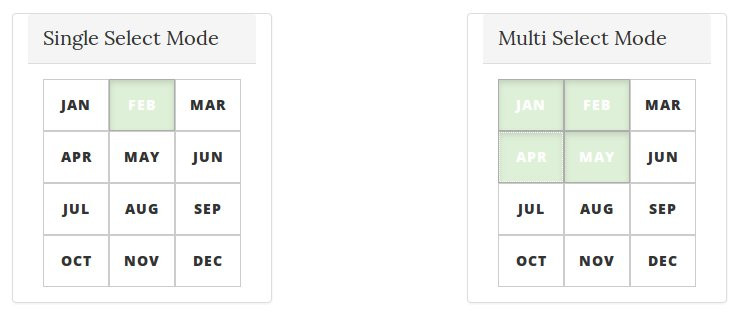
The HTML template for month-picker displays a button for each month, sets any selected buttons to ‘active’, and adds an event handler for when a user clicks on a month. The complete monthPicker.html is shown below. Notice it references a controller (ctrl) for its functionality but doesn’t actually include an ng-controller:
1
2
3
4
5
<div id="month-picker">
    <button ng-repeat="month in ctrl.months"
        ng-class="{ 'active': ctrl.isSelected(month) }"
        ng-click="ctrl.selectMonth(month)">{{ month }}</button>
</div>
The HTML template for month-picker requires a view-model, which we provide in the form of a controller function. Angular 1.2 introduced the ‘Controller As’ syntax, which binds scope to a controllers this reference and significantly simplifies controller design. Since we will be using this syntax the controller function contains no reference to $scope. Scope will be bound to the controllers this reference instead:
1
2
3
4
5
6
7
8
9
10
11
12
13
14
15
16
17
18
19
20
21
22
23
24
25
26
27
28
29
30
31
32
33
34
35
36
function controller() {
    var ctrl = this;

    ctrl.isSelected = isSelected;
    ctrl.months = ['Jan', 'Feb', 'Mar', 'Apr', 'May', 'Jun', 'Jul', 'Aug', 'Sep', 'Oct', 'Nov', 'Dec'];
    ctrl.selectMonth = selectMonth;

    function selectMonth(month) {
        if (isMultiMode()) {
            if (isSelected(month)) {
                // in multi-mode with month already selected
                // so remove month
                var index = ctrl.selected.indexOf(month);
                ctrl.selected.splice(index, 1);
            } else {
                // in multi-mode with month unselected
                // so add month
                ctrl.selected.push(month);
                ctrl.lastSelected({'month': month});
            }
        } else {
            // in single-select mode
            // so make month the only selected
            ctrl.selected = [month];
            ctrl.lastSelected({'month': month});
        }
    }

    function isMultiMode() {
        return ctrl.multi === 'true';
    }

    function isSelected(month) {
        return ctrl.selected.indexOf(month) > -1;
    }
}
You may have noticed that some of the properties referenced in the above controller function don’t appear to exist (for example ctrl.multi). The reason for this will become clear shortly, when we look at directive scope. First, lets see how we use the directive function to wire the HTML template and the controller function together.
Directive Definition Object (DDO)
We use the directive function to return a Directive Definition Object (DDO). This object contains configuration information for the component. The full list of possible properties is here, but we generally just use a subset corresponding to our requirements.
We will use the DDO to wire together the template and the controller by giving it three pieces of information: the location of the template (templateUrl), the controller function to use with the template (controller) , and how to refer to the controller from within the template (controllerAs). Note that because the controller function above is located in the same file as the directive function below, it is simply referenced by name.
1
2
3
4
5
6
7
8
function directive() {
    // directive definition object
    return {
        templateUrl: 'monthPicker.html',
        controller: controller,
        controllerAs: 'ctrl'
    };
}
Having looked at the separate parts – the HTML template, the controller function, and the directive function – lets wrap this functionality into a module:
1
2
3
4
5
6
7
8
9
10
11
12
13
14
15
16
angular
    .module('monthPickerModule', [])
    .directive("monthPicker", directive);

function directive() {
    // directive definition object
    return {
        templateUrl: 'monthPicker.html',
        controller: controller,
        controllerAs: 'ctrl'
    };
}

function controller() {
    // as above
}
This gives us a component directive, linking an HTML template with a controller function, that can be used on a web page like this:
<month-picker></month-picker>As it stands, using a directive to connect the controller and the HTML template is not much different from using ng-controller and an HTML ‘partial’. Although we have a nicer way of including the functionality in our page, the component is still exposed to its surrounding scope and brittle to changes. So lets do something about that.
Wiring up the scope
By default a directive shares its outside or parent scope, so has access to the scope of wherever it is included in a page. This can be changed in the DDO to provide a directive with its own scope, that does not prototypically inherit from its parent – called isolate scope. Giving directives isolate scope allows the parts that make up a component to be encapsulated from outside interference, and consequently, more robust and re-usable.
We give a directive isolate scope by setting a scope property in the DDO, passing in an empty object for its value:
1
2
3
4
5
6
7
8
function directive() {
    return {
        templateUrl: 'monthPicker.html',
        controller: controller,
        controllerAs: 'ctrl',
        scope: {}
    };
}
The directive is now isolated from its parent scope. This is great for encapsulation. However, month-picker needs some way of communicating when a month is selected, and it needs some way of being told whether to operate in single or multi-select mode. While we usually want a component directive to have isolate scope, it is also useful if it can take input from its outside scope, and provide output to it.
Communicating with a directive
Angular directives with isolate scope can selectively bind to properties derived from its parent scope through its tag attributes. It does this by passing passing a property into the isolate scope object in the format:
[property] : [bind symbol][attribute name]This creates a binding between attributes in the directive element tag and the directives isolate scope. So we can have an attribute on the directive element tag:
1
<some-element some-attribute='Some Value' />
Which is mapped to a property in the some-element directive like so:
1
2
3
scope: {
	someDirectiveProperty: '@someAttribute'
}
Which creates a binding between a property in the directives isolate scope (someDirectiveProperty) and an attribute on the component tag (some-attribute) in outside or ‘parent’ scope. This binding can take several formats, which we’ll look at in just a moment. First note that if we give the directive property the same name as the attribute then we can simplify the mapping:
1
2
3
scope: {
	someAttribute: '@'
}
So here the attribute some-attribute maps to a property called someAttribute in the directives isolate scope. Attribute and element names appearing in a directive tag are automatically ‘normalised’ into their camel case equivalents when used within a directive, so some-attribute is converted to someAttribute.
Types of isolate scope bindings
There are three ways a component directive can bind to an attribute. The binding symbol signifies which of them to use – either @, =, or &.
The @ binding expects a simple string value that is passed into the directives isolate scope. Any changes made to this value from the directive elements parent/outside scope are updated in the directives isolate scope. But not the other way around. If the value is changed from within the directives isolate scope, these changes are not reflected back to its outside scope. So this option provides one-way string binding.
As well as one-way string binding we can use two-way model binding, represented by =. In this case we can bind a directives isolate scope to a model value in its parent/outside scope. This value can be a simple string, an array, or an object, and changes are reflected both ways.
The third and final type of binding, &, provides a way for the isolate scope to execute an expression in its outside scope. Commonly, we want to call a function in the outside scope, possibly passing in some parameter values from the isolate scope. So given the following directive element tag, whose contents calls a function in the directives outside scope:
<some-element someAttribute="outside.someFunction(someValue)" />And is bound to the directives isolate scope like so:
scope: {
	someAttribute: '&'
}
Then we can force evaluation of the outside scope expression, which calls outside.someFunction(someValue), by calling it from the isolate scope. Notice how parameters are passed as object literals rather than simply values:
inside.someAttribute({ 'someValue': 'hello' });This last case may seem a bit obscure. But its useful for informing the outside scope when an event happens in the isolate scope, such as when a button is clicked.
Understanding how these bindings work, lets take a look at the finished month-picker directive function:
1
2
3
4
5
6
7
8
9
10
11
12
13
function directive() {
    return {
        templateUrl: 'monthPicker.html',
        controller: controller,
        controllerAs: 'ctrl',
        scope: {
            multi: '@?',
            selected: '=',
            lastSelected: '&'
        },
        bindToController: true
    };
}
The last property of the DDO, bindToController causes the isolate scope properties to be bound to the directives controller function, rather than its scope. The upshot of this is when the directives controller is instantiated, it will have the three scoped properties above available through its this reference. Which explains why some of the properties referenced in the controller don’t actually appear to exist (e.g. ctrl.multi) – they are added by Angular based on the values included in the scope property of the directives DDO.
We can now use these attributes in our custom directive element to communicate between the parent/outside scope and the directives isolate scope. In the case below, PageController represents the outside scope that the attributes of the month-picker tag bind to:
1
2
3
4
5
6
7
8
9
10
11
12
13
14
<body ng-app="app"  ng-controller="PageController as page">

	<!--code ommitted-->

   <month-picker
       multi="{{ page.multiMode }}"
       selected="page.selectedMonths"
       last-selected="page.setLastSelectedMonth(month)">
   </month-picker>
   <input type="checkbox" ng-model="page.multiMode" />multi mode

	<!--code ommitted-->

</body>
This creates lines of communication between the outside scope of the page the element appears in, and the isolate scope of the directive. If we have several component directives on a page we can use this approach to communicate between them. This method is used in the sample application. A PageController maintains a view-model between the month-picker, alert-list, and alert-add component directives:
1
2
3
4
5
6
7
8
9
10
11
12
13
14
15
16
angular
    .module("pageControllerModule", [])
    .controller("PageController", controller);

function controller() {
    var ctrl = this;

    ctrl.lastSelectedMonth = "";
    ctrl.multiMode = true;
    ctrl.selectedMonths = ['Jan', 'Feb'];
    ctrl.setLastSelectedMonth = setLastSelectedMonth;

    function setLastSelectedMonth(month) {
        ctrl.lastSelectedMonth = month;
    }
}
Here ends this basic description of how the month-picker component directive works. You will see from the source code of the sample application that the alert-list and alert-add component directives work in an almost identical way.
Conclusion
In this post I have outlined how to use AngularJS to create basic component directives by combining an HTML template, a controller function, and a directive function, and wrapping them up into a module. This approach allows us to create encapsulated, re-usable components that live within their own isolated scope.
When creating components there are many use cases where we want to be able to have content within component directive tags and do something with that content. For this we need to understand Angulars transclusion mechanism, which I will look at in the next post.
Source code is available on GitHub.