Transclusion is the process of extracting a collection of DOM element from one part of the DOM and copying them to another part of the DOM, while maintaining their connection to the original AngularJS scope from where they were taken.
In the previous post I demonstrated how to use AngularJS to create encapsulated component directives that ‘extend’ the functionality of HTML, allowing us to create an HTML-like Domain Specific Language to use within our web pages.
There are use cases where we want to in some way process the HTML content that appears between a component directives tags, while maintaining the original scope of that content. This process is called ‘transclusion’. Angular gives us complete control over where we append the transcluded content within the DOM. But it also provides a built-in option that simplifies the process for the most common use-cases.
As in the previous post, I’ll use the sample application and source code for illustration. Here transclusion operates in two component directives – panel and page. I’ll begin by considering how Angulars built-in transclusion works in the panel component directive.
Built-in transclusion
The panel component in the sample application uses Angulars built-in transclusion mechanism to format content as a ‘panel’ – basically a bordered box with a header:
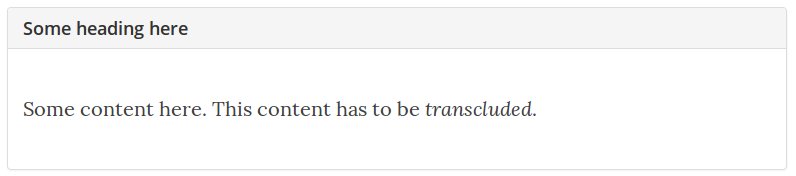
The component user includes it on a page by placing their content within the panel component directive tags and including a heading attribute:
1
2
3
<panel heading="Some heading here">
	<p>Some content here. This content has to be <i>transcluded</i>.</p>
</panel>
To create the rendered panel the component directive provides the following HTML template, formatted using Bootstrap:
1
2
3
4
<div class="panel panel-default">
    <div class="panel-heading"><h4>{{ctrl.heading}}</h4></div>
    <div class="panel-body" ng-transclude></div>
</div>
The main item of interest is the ng-transclude attribute. This tells Angular where in the template to locate the transcluded contents of the <panel></panel> tags. The content will be appended to whichever element ng-transclude appears in. In the above example, to the div with the panel-body class (line 3).
We must explicitly say we want transclusion in the Directive Definition Object (DDO) by including transclude: true. There’s not much to this component, and little in the way of controller functionality – just a heading which is passed in through isolate scope. Here is the finished module:
1
2
3
4
5
6
7
8
9
10
11
12
13
14
15
16
angular
        .module('panelModule', [])
        .directive('panel', directive);

function directive() {
    return {
        transclude: true,
        templateUrl: 'panel.html',
        controller: function () {},
        controllerAs: 'ctrl',
        scope: {
            heading: '@'
        },
        bindToController: true
    };
}
Its important to understand that transcluded content will continue to be linked to the original scope of where it was taken from – usually referred to as the components ‘parent’ or ‘outside’ scope. This is usually what we want. It allows us to target the transcluded content without having to go through the directive. Examples of this can be seen in index.html of the sample application:
1
2
3
4
5
6
7
8
9
10
11
12
13
14
15
16
17
18
19
20
21
22
23
24
25
26
27
28
29
30
<body ng-app="app" ng-controller="PageController as page">
    <page>

        <!-- code omitted -->

        <panel heading="Add Alert">
            <alert-add current-month="{{page.lastSelectedMonth}}"></alert-add>
        </panel>

        <!-- code omitted -->

        <panel heading="Month picker">
            <month-picker
                multi="{{page.multiMode}}"
                selected="page.selectedMonths"
                last-selected="page.setLastSelectedMonth(month)">
            </month-picker>
            <input type="checkbox" ng-model="page.multiMode" /> multi mode
        </panel>

        <!-- code omitted -->

        <panel heading="Alerts">
            <alert-list months="page.selectedMonths"></alert-list>
        </panel>

        <!-- code omitted -->

    </page>
</body>
Here the panel component is used to wrap several other components, without interfering with the scope provided by PageController through the page variable. If the scope of the transcluded content within a panel was not preserved, then month-picker, alert-list and alert-add would no longer work as expected.
Custom transclusion
Angulars built-in transclusion is a course-grained mechanism. It takes everything between a component directives tags, and appends it wherever it finds an ng-transclude attribute in its directives HTML template. This is fine for many use cases. Particularly those moving arbitrary HTML from one place to another, like the panel component just considered.
If this is not enough, we can write our own transclusion functionality and gain complete control over the transcluded content. Since transclusion involves DOM manipulation we must be careful not to interfere with Angulars own DOM manipulation processes – compile and link. Fortunately, Angular provides us with a function where it is safe to manipulate the DOM (among other things) called the link function. There’s a lot to the link function. The focus here is on how it will help us perform custom transclusion.
The link, transclude, and clone attach functions
Angular provides the link function as a safe place to perform DOM manipulation. We access it by passing a function into the DDOs link property with the following signature:
function link(scope, iElement, iAttributes, controller, transcludeFn) {
    //
}
The function is called once for each directive element added to a page. So in index.html shown earlier, it will be called three times in the panel directive as there are three sets of <panel></panel> tags. Despite its name, compiling and linking has been completed by the time the link function is called. Which is why its a safe place to perform DOM manipulation.
Parameters to the link function provides us with access to the various facets of the directive instance we may wish to manipulate, specifically:
- its scope
- the compiled and linked instance of the directive element derived from the components HTML template – wrapped either as a jQuery or jqLite object[1]
- the attributes on the element instance
- its controller (if it has one)
- the transclude function (if
transclude: truewas set in the DDO)
If we wish to perform DOM manipulation then the transclude function should be provided with a custom ‘clone attach function’. This is where we place our custom transclusion code:
function (clone, scope) {
	// do something with transcluded content
}
The parameter clone is a freshly compiled copy of the transcluded content. And scope is the newly created transclusion scope to which this cloned content is bound. Transclusion scope is a special type of scope that is technically a child of the directives scope but inherits the properties of the scope from which it was taken.
Best practice is to perform all DOM manipulation within a ‘clone attach function’. Which usually involves appending the clone to the DOM in some way. Be aware that if we later remove the cloned content from the DOM, then we are also responsible for destroying its transclusion scope (the built-in transclusion mechanism takes care of this for us, so that’s a good reason to prefer it where possible).
In order to understand custom transclusion, lets look at how we would write our own transclusion functionality to mimic Angulars built-in mechanism described previously.
Mimicing ng-transclude with custom transclusion
In the panel link function below, a target element is found within the directive element (basically the HTML template) by searching for an ng-transclude attribute. The transclude function is then called with a custom clone attach function, which simply empties the previously found target of any existing content, and attaches the newly cloned (transcluded) content instead:
1
2
3
4
5
6
7
8
9
10
11
12
13
14
15
16
17
18
19
20
21
22
23
24
function directive() {
    return {
        transclude: true,
        templateUrl: 'panel.html',
        controller: function () {},
        controllerAs: 'ctrl',
        scope: {
            heading: '@'
        },
        bindToController: true,
        link: link
    };
}

function link(scope, iElement, iAttr, ctrl, transcludeFn) {
    // find element with ng-transclude attribute
    var target = iElement.find('[ng-transclude]')
    // pass 'clone attach function' to transclude
    transcludeFn(function (clone, transcludeScope) {
        // replace target content with clone
        target.empty();
        target.append(clone);
    })
}
If we did not empty the target content, we would have two lots of transcluded content in each panel. That’s because Angulars built-in transclusion is still taking place, using the ng-transclude attribute, and has already been done by the time the link function is called. When we call it again passing in our own clone attach function, the previous content is emptied with target.empty(), and we append a fresh clone with target.append(clone).
Its a contrived example, as we are repeating the functionality of Angulars built-in transclusion. Where possible its better to use the built-in version. One use case for writing our own transclusion functionality is if we want to transclude different sections of content to different places within our HTML template. This is what the page component directive does, so lets look at that next.
Custom transclusion in the page component
The page component provides a method of forcing a pre-defined page structure onto developers of our site. The idea is that developers using the page directive mark their content with a layout attribute. The marked content is then transcluded into the page directives HTML template, at a location determined by the layout tag. This makes it easier to keep a consistent site layout when pages are being worked on by different developers. Here is the sample site with the different sections highlighted in red:
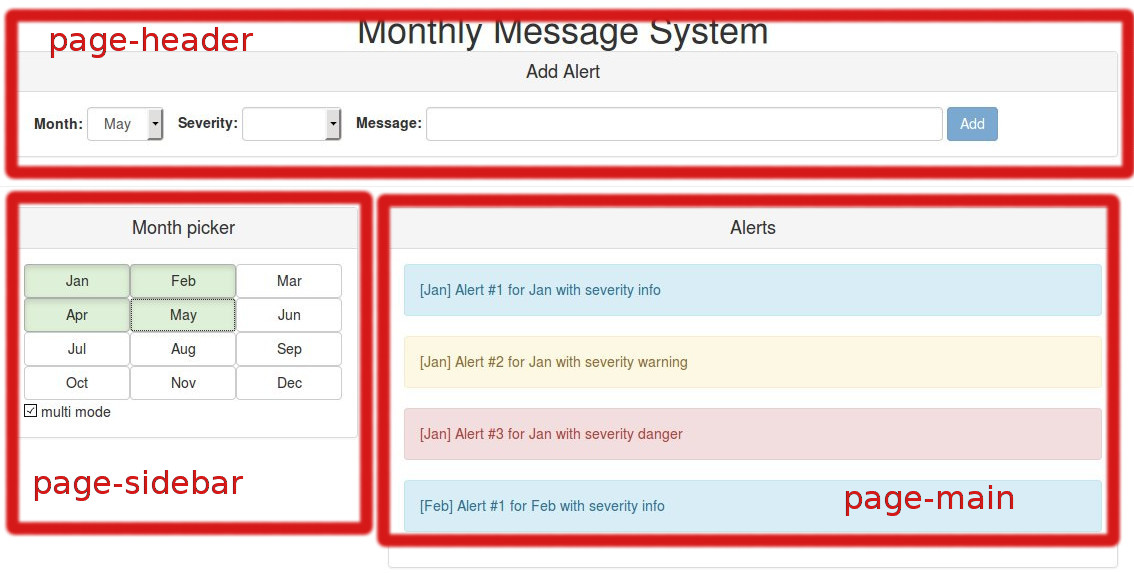
The component user includes the page element in the following way:
1
2
3
4
5
6
7
8
9
10
11
12
13
<page>
    <div layout="page-header">
		<!--header content here-->
    </div>

    <div layout="page-sidebar">
		<!--sidebar content here-->
    </div>

    <div layout="page-main">
		<!--main content here-->
    </div>
</page>
The layout attribute defines the location the content should be transcluded to in the page directives HTML template. The value for the layout attribute must have a corresponding id in the template in order to be included. Here is the page directives HTML template:
1
2
3
4
5
6
7
8
<div class="container">
    <div id="page-header" class="col-md-12"></div>
    <div id="page-sidebar" class="col-md-4"></div>
    <div id="page-main" class="col-md-8"></div>
    <div id="page-footer" class="col-md-12">
        <footer><h5>MMS Copyright 2015</h5></footer>
    </div>
</div>
The directive function is pretty short, as there’s no controller:
1
2
3
4
5
6
7
8
function directive() {
    return {
        transclude: true,
        templateUrl: 'page.html',
        scope: {},
        link: link
    };
}
Most of the work is done in the clone attach function (lines 3 to 20 below), which is passed into the transclude function when we call it within the link function. It loops through the different nodes within the clone (which contains the content that is to be transcluded), appending them to their corresponding location within the compiled instance of the component directive:
1
2
3
4
5
6
7
8
9
10
11
12
13
14
15
16
17
18
19
20
21
function link(scope, iElement, attrs, ctrl, transcludeFn) {
    // call transclude with custom clone attch function
    transcludeFn(function (clone) {
        // loop through nodes in the clone
        angular.forEach(clone, function (cloneEl) {
            // only interested in element nodes with a 'layout' attribute
            if (cloneEl.nodeType === 1 && cloneEl.attributes["layout"]) {
                var targetId = cloneEl.attributes["layout"].value;
                var target = iElement.find("#" + targetId);
                if (target.length) {
                    target.append(cloneEl);
                } else {
                    cloneEl.remove();
                    throw new Error('Target not found, specify correct layout attribute');
                }
            } else {
                cloneEl.remove();
            }
        });
    });
}
If an element within the clone does not match an id in the page components HTML template the element is removed, and an error thrown. We have to be careful, particularly in a Single Page Application (SPA), to avoid memory leaks caused by stale references to browser objects.
Given the additional overhead when using custom transclusion – both in terms of coding the clone attach function and being responsible for the lifecycle of the scope of the transcluded content – it is generally a good thing if we can avoid it and stick to Angulars built-in mechanism. While avoiding custom transclusion may not always be possible, there are scenarios where further modularising a component directive can make using built-in transclusion an option.
Avoiding custom transclusion with sub-components
Angulars built-in transclusion through the ng-transclude attribute is not as limiting as it may first appear. Returning to our panel component. Recall that it used built-in transclusion to create the body of the panel, while the heading was passed in through an attribute:
1
2
3
4
<div class="panel panel-default">
    <div class="panel-heading"><h4>{{ctrl.heading}}</h4></div>
    <div class="panel-body" ng-transclude></div>
</div>
Say we had a new requirement that stated the panel component must be able to deal with arbitrary HTML in the header, rather than the current plain text. This would give us two different HTML fragments that need to be placed in different locations within the panel HTML template. From what has been discussed so far we’d be forgiven for thinking that writing our own clone attach function was the way to go. And this would be a legitimate approach. However, if we further modularise our application, then another option becomes apparent.
Rather than treating the panel component as a single thing, what if we broke it down into smaller components – panel, panel-header and a panel-body – where panel is the parent of the other two:
1
2
3
4
5
6
7
8
<panel>
    <panel-header>
        <h4>Some heading here</h4>
    </panel-header>
    <panel-body>
        <p>Some content here. This content has to be <i>transcluded</i>.</p>
    </panel-body>
</panel>
Now the panel directive can perform a single transclude of all of its contents, provided any child elements marked for transclusion are already transcluded. In this scenario the contents of panel can just be treated as one thing. Fortunately, Angular takes care of this for us. It knows that if transcluded content has children with transcluded content then these children must be transcluded first.
So we re-factor panel to have additional directives for panel-header and panel-body, and apply Angulars built-in transclusion to all three. The panel-header and panel-body elements will be processed first, and the result of their transclusion fed into the panel component. Here is the updated panel module:
1
2
3
4
5
6
7
8
9
10
11
12
13
14
15
16
17
18
19
20
21
22
23
24
25
26
27
28
29
angular
        .module('panelModule', [])
        .directive('panel', panelDirective)
        .directive('panelHeader', panelHeaderDirective)
        .directive('panelBody', panelBodyDirective);

function panelDirective() {
    return {
        transclude: true,
        templateUrl: 'panel.html',
        scope: {}
    };
}

function panelHeaderDirective() {
    return {
        transclude: true,
        templateUrl: 'panelHeader.html',
        scope: {}
    };
}

function panelBodyDirective() {
    return {
        transclude: true,
        templateUrl: 'panelBody.html',
        scope: {}
    };
}
There’s not much going on apart from transclusion, so the panel, panel-header, and panel-body all have the same basic template, only differing in their CSS classes:
<div class="..." ng-transclude></div>The end result is the same as before:
The difference is that we can now put arbitrary HTML in the panel header. By dividing the panel component directive into smaller components we have managed to fulfil the requirement without needing custom transclusion.
Conclusion
In this second post on component directives in AngularJs 1.3 I have looked at how we transclude the content between a component directives tags and append it to the DOM. We have seen that Angular provides a built-in transclusion mechanism, and when this is not enough, allow us to manually control the transclusion process. Finally, I looked at how dividing a component directive into sub-components can sometimes provides a means of avoiding custom transclusion.
There is more to say on building component directives from sub-directives, particularly in terms of communication. And, to keep the posts focused on the subject at hand, I have so far skirted around the topic of inter-component communication in general. These will have to keep for another post.
The complete source for the sample application used in this and the previous post can be found on GitHub. The code for the new panel component is in a separate branch.
Notes
- if jQuery is available when Angular loads, then this will be wrapped as a jQuery object. Otherwise it uses the built-in jqLite to wrap it instead
1