How the transactional outbox pattern, Debezium, and Kafka close the transaction-boundary gap — and what’s still unsolved once things become partly asynchronous?
In a previous post I looked at both sides of rate limiting a SpringBoot service with Resilience4j. On one side the called email-service protected itself with a rate limiter. On the other side the calling rest-service reacted to the 429 Too Many Requests and to the returned headers in order to reduce additional (likely failing) calls. That post ended with two unresolved problems.
One of the problems was around transaction boundaries. rest-service called the (possibly slow, possibly failing, knowingly rate-limited) email-service from inside the same request that saved the order. Splitting that request into two short transactions kept database connections from piling up, but introduced a dual-write problem. This is the problem I wish to address here.
The code can be found in this repo. You can see an architectural summary of this solution by clicking on the image below:
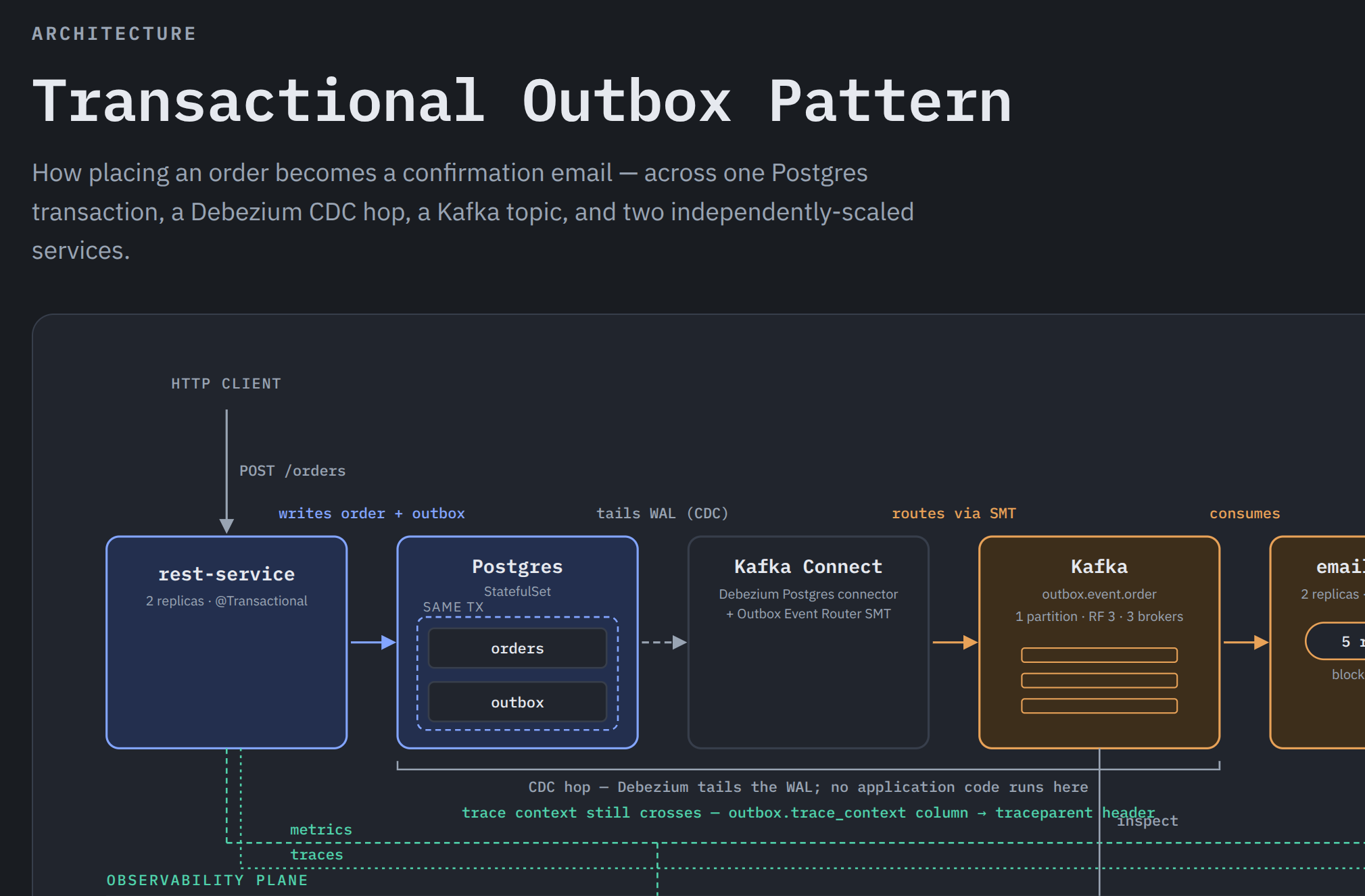
Fixing the dual-write problem
A common fix to the dual-write problem is the transactional outbox pattern. If we use the same domain as the previous post we have the following flow:
rest-servicewrites the order and an outbox event in the same database transaction.- Debezium reads the database transaction log and relays the outbox event to Kafka.
email-serviceconsumes the Kafka event and sends the confirmation email at its own pace.
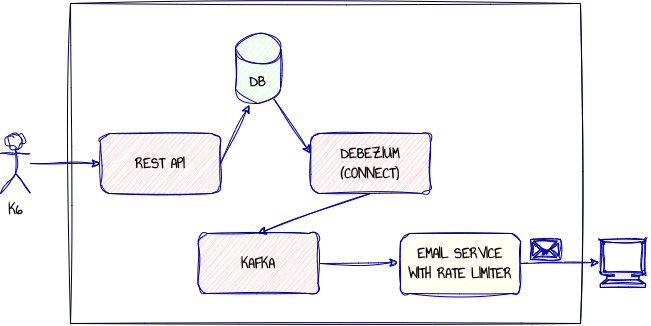
Writing the Order and the Outbox Event Together
The key point here, if we want to fix the dual-write problem, is for the rest-service to write both the order and the outbox records in a single @Transactional method:
@Transactional
public Order createOrder(CreateOrderRequest request) {
    Order order = new Order(UUID.randomUUID(), request.customerEmail(), request.amount(), Instant.now());
    orderRepository.save(order);

    OutboxEvent event = new OutboxEvent(UUID.randomUUID(), "order", order.getId().toString(), "OrderCreated", writePayload(order));
    outboxEventRepository.save(event);

    return order;
}
Because the order row and the outbox row are saved in the same transaction, there is no point where the order is committed but the intention to send the email has been lost. Or vice versa. Either both rows commit, or neither row commits.
Relaying the Outbox
Something still has to get rows from the outbox table into Kafka. This is where Kafka Connect and Debezium come in.
Kafka Connect is the general-purpose runtime framework for data integration, while Debezium is a specialised family of Change Data Capture (CDC) connectors that run on top of it.
By default PostgreSQL uses something called Write-Ahead Logging (WAL). Before making changes to its actual data files it first writes the intended changes to a WAL log file. If the system crashes, the WAL can be used to restore the database to a consistent state.
We can use Karfa Connect/Debezium as a method of Change Data Capture to stream the content of these WAL files to Kafka.

Debezium reads the Postgres write-ahead log rather than polling the table directly. When an application inserts an outbox row Postgres records that insert in the WAL. The Debezium connector streams that change into Kafka Connect, where the Outbox Event Router reshapes the raw database change event into a domain event.
Without this reshape, consumers would see a Debezium change-data-capture envelope containing table metadata, operation type, before/after row state, and connector details. The Event Router reshapes raw CDC records into clean domain messages, using the
aggregate IDfor the Kafka message key and theaggregate typeto determine the target topic
In Kubernetes, the connector is declared as a Strimzi KafkaConnector:
apiVersion: kafka.strimzi.io/v1
kind: KafkaConnector
metadata:
  name: outbox-connector
  namespace: kafka
  labels:
    strimzi.io/cluster: outbox-connect
spec:
  class: io.debezium.connector.postgresql.PostgresConnector
  tasksMax: 1
  config:
    database.hostname: postgres
    database.port: "5432"
    database.user: postgres
    database.password: postgres
    database.dbname: outbox
    topic.prefix: rest-service
    schema.include.list: public
    table.include.list: public.outbox
    plugin.name: pgoutput
    slot.name: outbox_slot
    publication.autocreate.mode: filtered
    tombstones.on.delete: "false"
    key.converter: org.apache.kafka.connect.storage.StringConverter
    value.converter: org.apache.kafka.connect.storage.StringConverter
    transforms: outbox
    transforms.outbox.type: io.debezium.transforms.outbox.EventRouter
    transforms.outbox.route.by.field: aggregatetype
    transforms.outbox.table.field.event.id: id
    transforms.outbox.table.field.event.key: aggregateid
    transforms.outbox.table.field.event.type: type
    transforms.outbox.table.field.event.payload: payload
    transforms.outbox.route.topic.regex: "(?<routedByValue>.*)"
    transforms.outbox.route.topic.replacement: "outbox.event.${routedByValue}"
Consuming the Event
In the earlier rate-limiter post, the HTTP endpoint returned 429 Too Many Requests when the quota was exhausted. That made sense for an HTTP caller that needed an immediate response. Using the Spring@KafkaListener annotation email-service is now a Kafka consumer instead:
@KafkaListener(topics = OUTBOX_ORDER_TOPIC)
void onMessage(String payload) {
    confirmationService.send(readEvent(payload));
}
@KafkaListener hides a poll-Kafka loop. Spring runs a background thread that continually calls poll(), and for each record returned, it calls
onMethodon that same thread.
The actual send operation is still protected by Resilience4j:
@RateLimiter(name = "emailSender")
void send(OrderCreatedEvent event) {
    log.info("Sent confirmation email to {} for order {} ({})",
            event.customerEmail(), event.orderId(), event.amount());
    emailsSent.increment();
}
But now if the rate limiter blocks, the confirmation emails are delayed rather than skipped.
Running the System
The current version of this prototype runs on a local Kind cluster. The stack includes:
- 3 Strimzi-managed Kafka brokers.
- 2 replicas of
rest-service. - 2 replicas of
email-service. - A single Postgres
StatefulSet. - Kafka Connect with the Debezium Postgres connector.
- Prometheus, Grafana, and Tempo for metrics and tracing.
Start it with:
./up.sh
The script creates the Kind cluster, installs the Strimzi operator, builds and loads the local service images, applies the Kubernetes manifests, and waits for the main workloads to become ready.
Once the cluster is up, get a node IP:
NODE_IP=$(docker inspect outbox-worker | jq -r '.[0].NetworkSettings.Networks.kind.IPAddress')
Then create an order through the public NodePort:
curl -i -X POST http://$NODE_IP:30081/orders \
  -H 'Content-Type: application/json' \
  -d '{"customerEmail": "you@example.com", "amount": 19.99}'
rest-service quickly returns 201 Created after writing the order and the outbox row. It does not wait for email-service.
Observing the Load Test
The k6 test drives the full path through the public HTTP interfaces:
NODE_IP=$(docker inspect outbox-worker | jq -r '.[0].NetworkSettings.Networks.kind.IPAddress')
k6 run \
  -e REST_SERVICE_URL=http://$NODE_IP:30081 \
  -e EMAIL_SERVICE_URL=http://$NODE_IP:30082 \
  -e PROMETHEUS_URL=http://$NODE_IP:30390 \
  k6/outbox-load-test.js
The default run posts 20 orders over about 10 seconds. That is faster than the configured email limit of 5 sends per 10 seconds.
The test checks three things:
- every order request returns
201; emails.senteventually increases by 20;- delivery takes long enough to prove the rate limiter was actually exercised.
█ THRESHOLDS

checks
✓ 'rate==1.0' rate=100.00%


█ TOTAL RESULTS

checks_total.......: 22      0.474821/s
checks_succeeded...: 100.00% 22 out of 22
checks_failed......: 0.00%   0 out of 22

✓ POST /orders returns 201
✓ emails.sent reaches 20 within 90s
✓ delivery took at least as long as the rate limiter mandates (throttling was actually exercised)
The important difference from the synchronous HTTP versions is the outcome. The order API accepts the requests immediately, and all 20 emails are eventually sent. Under pressure (see next section), Kafka absorbs the mismatch between order creation speed and email sending speed.
In the earlier rate-limiter version, excess work would become SKIPPED or RATE_LIMITED. In this version, the same pressure shows up as Kafka consumer lag.
Good result :)
Metrics and Tracing
Prometheus and Grafana are included because the behavior is no longer visible in a single HTTP response.
Grafana is exposed on:
http://$NODE_IP:30300
The dashboard shows:
- orders created versus confirmation emails sent
- consumer lag for
outbox.event.order - Kafka partition leadership across the brokers
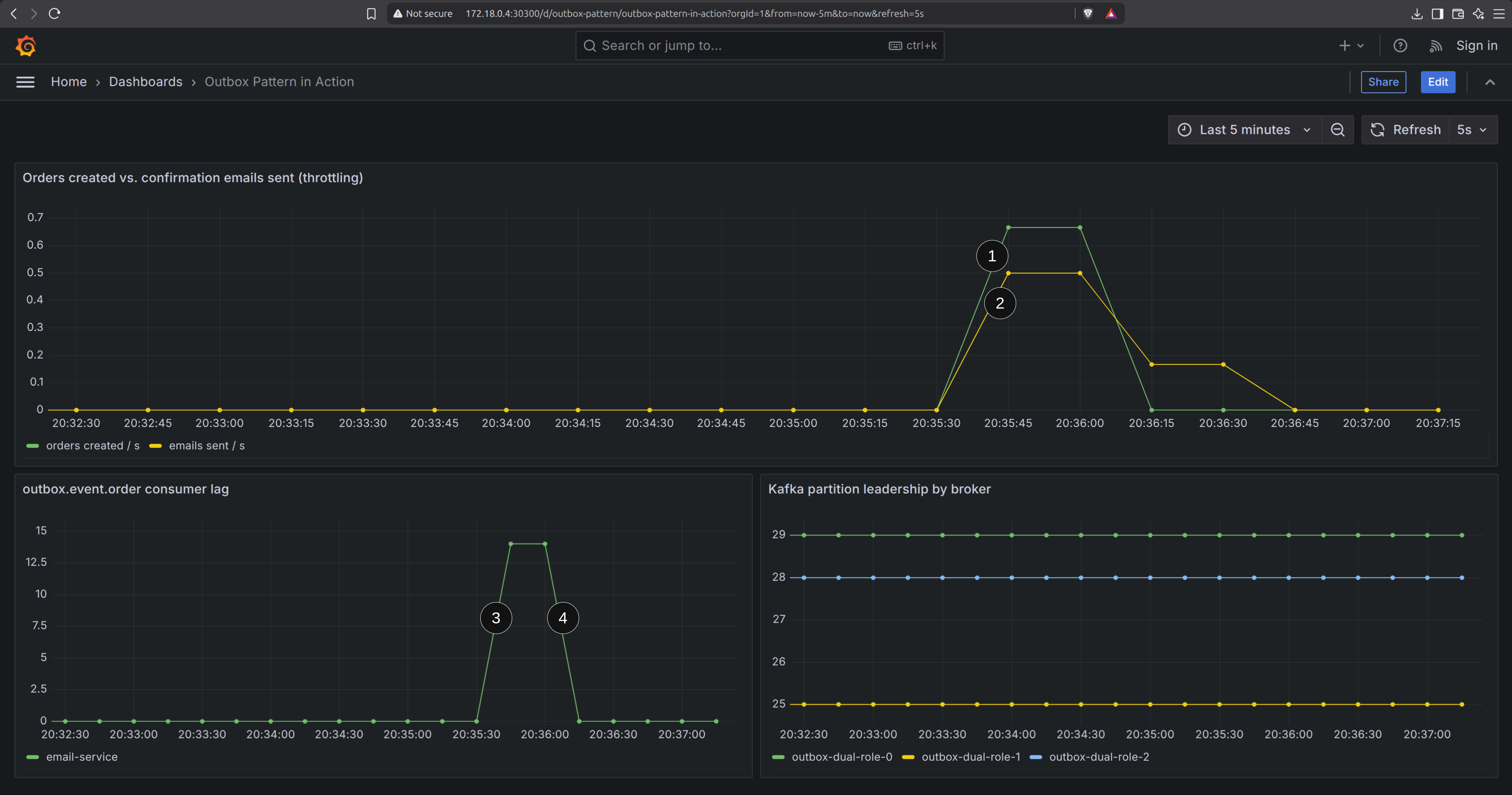
This highlights a number of pertinent points with regards Kafka and the Rate Limiter:
- Orders rise quickly
- Emails rise more slowly, in line with the configured downstream capacity
- Consumer lag rises while the order burst is ahead of the email sender
- … then drains as the consumer catches up
While we are here, let us see what happens when a partition goes temporarily offline. I have looped the K6 tests to keep requests flowing to the system. Then I did a kubectl delete on one of the brokers. Of course, kubernetes creates a new replica fairly quickly, but there is a (albeit temporary) broker failure:
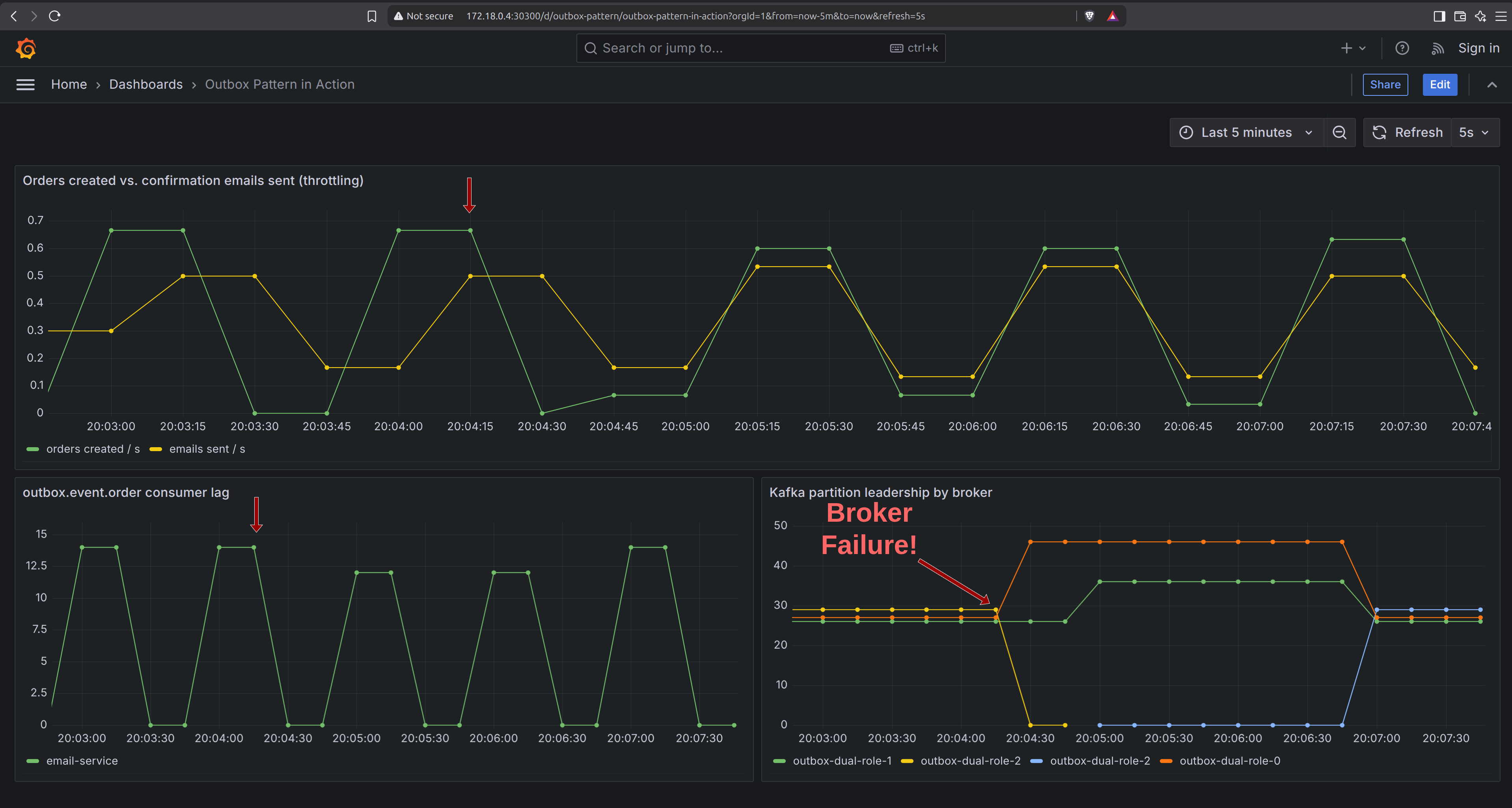
As Grafana illustrates, the partition leader is quickly replaced, and the interruption does not stop the processing of emails (though in this case you can notice the small impact on the rest-service).
What this fixes
This fixes the transaction boundary problem from the last synchronous Resilience4j example. rest-service no longer holds a database transaction open while waiting for email-service. The durable intent to send the email is written in the same transaction as the order.
It also changes the role of the rate limiter. In the previous HTTP version the rate limiter protected the email service by rejecting excess requests. In this version, the rate limiter just slows the consumer down. That is a better fit when the work is important enough to complete later rather than fail fast.
Also, Kafkas “partition per consumer” approach makes centralising the rate limiting using something like Redis and Bucket4j unnecessary (at least for the moment). Kafka already limits to a single partition per consumer, and consequently only one consumer is rate limited (providing it is not consuming from other topics).
What this does not fix
In terms of a production system there are a number of issues still to be addressed:
- no alerting, if anything fails we will not know until someone else informs us
- no HA on the database, no PodDisruptionBudget, or maintenence on the WAL
- no Dead Letter Queue (DLQ) or retry logic
- potential duplication because
POST /ordersis not idempotent
Of these issues I think the most coding-intense is the potential duplication of POST requests. One solution is to make the OrderCreated consumer idempotent. I plan to look at this next.
Conclusion
The transactional outbox pattern closes the dual-write gap a previous post left open. Writing the order and the outbox event in one transaction means there’s no window where the two can disagree, and moving email delivery onto Kafka means rest-service no longer waits on email-service at all — not for the database transaction, and not for the request thread either.
Notes
- Other solutions are available (https://www.confluent.io/blog/dual-write-problem/)
- You can see different Kafka partitioning strategies here (https://www.conduktor.io/glossary/kafka-partitioning-strategies-and-best-practices)