This is the first of three posts exploring creating, testing, deploying, and observing a non-trivial REST application created using Spring Boot:
- Part 1: build a modern Spring REST application using Aggregates, Command Query Separation, and sensible unit tests
- Part 2: deploy the application to a local Kubernetes cluster using KIND, Helm, and the new GatewayAPI for HTTP access
- Part 3: use Terraform to create the local development environment and add Prometheus and Grafana observation
I wrote a simple non-trivial Spring REST application to experiment with the following technologies:
- Java
2125 (LTS) - Spring Boot 4.x (Spring 7.x)
- Spring Data JPA / Hibernate 7
- H2 (tests) + Postgres (runtime)
- AssertJ
- K6 (load testing)
… with these aims:
- non-anemic domain model using aggregates
- separate Command and Query operations
- sensible tests aimed at specific layers of the application
The domain looks like this:

The application is broken down into layers.
- Domain / JPA Repository Layer
- Application Service Layer
- REST Controller Layer
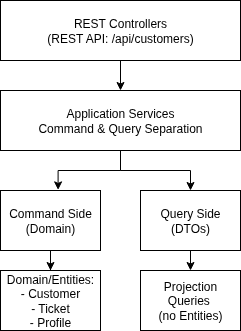
I will briefly summarise each of these layers, and point to where the important code and tests are.
Domain / JPA Layer
The main classes in this layer are:
A focus was to avoid an anemic domain model by using aggregates:
An aggregate is a cluster of associated objects treated as a single unit for data changes, with a clearly defined boundary and a root entity that enforces invariants.
— Eric Evans, Domain-Driven Design
In this first iteration, I suggest 2 aggregates, Customer and Tag. I will focus on the Customer aggregate:
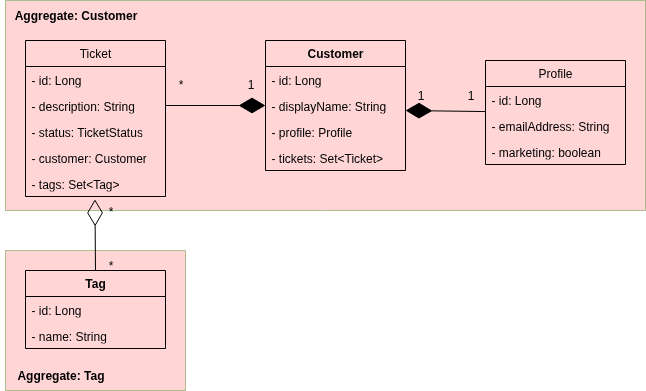
The basic idea of aggregates is that by fencing entities into logical groups (each group called an aggregate) and controlling access to this group through a single entity within the group (called the aggregate root) it is easier to prevent invalid state because the invariants are encapsulated. Think Facade pattern, where one of the original Classes gets promoted (for good reason) to the Facade. If there is no obvious candidate to take charge of the group, maybe the group is more than one group. Identifying aggregates and roots is not necessarily a simple process.
In this design the aggregate root does not expose internal entities directly.
For example, take Customer, our aggregate root. It has no entity objects as return values. And it is the only entity in the aggregate with public methods - neither Ticket nor Profile have any.
Also note that all the entities in the aggregate focus on domain behaviour (like resolveTicket()) rather than setters (like setStatus('resolved')). The idea is to use domain language, not generic technical terms. ‘Resolve ticket’ has meaning within the domain.
Domain tests for the sample application include unit tests that run without any JPA context. And @DataJpaTest tests:
Application Service Layer
The main classes in this layer are:
It can be useful to separate the processes that query a system from the processes that change it. That way we can implement different approaches (or even different models) for the query and the mutate parts. This is the basis of the generic Object Oriented pattern Command Query Separation, and the more involved Command Query Responsibility Segregation (CQRS):
The really valuable idea in this principle is that it’s extremely handy if you can clearly separate methods that change state from those that don’t. This is because you can use queries in many situations with much more confidence, introducing them anywhere, changing their order. You have to be more careful with modifiers.
The application services are split between CustomerCommandService and CustomerQueryService. This is not full CQRS — just a pragmatic separation to keep writes behaviour-focused and reads efficient.
CustomerCommandService talks directly to the Customer aggregate root to apply changes to the data using Command objects. One outcome of this approach is you can end up with a lot of Command objects, since the recomendation is usually to use one object per command. These simple data carriers can be represented with records for convenience.
CustomerQueryService uses its CustomerQueryRepository and JPQL, avoiding the domain model entirely. The Query side returns projections in the form of records.
Tests for this layer can be found in:
REST Controller Layer
The main classes in this layer are:
This is a vanilla Spring REST controller layer. Its thin, uses DTOs for requests, and basically calls the Application Layer.
Tests for this layer can be found in:
Seeder
The demo application includes a seeder which fills the database with 5,000 Customers and related data. The seeder classes are:
The SeedCommandLineRunner runs DemoDataSeederService when the Spring profile is “seed”.
Docker
You can run the Spring Demo application along with a Postgres database and the above seeder using Docker/docker-compose. The important files are:
Running the following will build and seed the application:
docker compose up --build --detach
To just run the application and Postgres (no seeding):
docker compose -f docker-compose-no-seed.yaml up --build --detach
GitHub build script
I have included a GitHub Actions script to publish the container image produced by the Spring Demo application. It is published to GitHub Container Registry.
This image is used by Part 2 and Part 3 of this series of posts.
K6 tests
Provided K6 is installed, you can run write and read tests. Run the write test like this:
k6 run \
  -e TEST_PROFILE=smoke \
  -e BASE_URL=http://localhost:8080 \
  ./k6/write-test.js
If thats clean, you can try running using TEST_PROFILE=load and TEST_PROFILE=stress. Be aware that ‘stress’ may cause some failures (it does on my laptop). Which can be very useful.
Same for the read tests:
k6 run \
  -e TEST_PROFILE=smoke \
  -e BASE_URL=http://localhost:8080 \
  ./k6/read-test.js
Convenience up and down scripts
I have included convenience scripts for bringing the system up (up.sh) and taking it down (down.sh):
Conclusion
Thats it! We now have a Spring REST Demo application with:
- a non-anemic domain model using aggregates
- separate Command and Query operations
- sensible tests aimed at specific layers of the application
Resources
- Domain-Driven Design Reference - Eric Evans
- Domain-Driven Design: Reference Definitions and Pattern Summaries - Eric Evans
- Command Query Separation pattern - Martin Fowler
- Command Query Responsibility Segregation (CQRS) - Martin Fowler
- Getting started with CQRS
- Services in domain Driven Design
- Domain-Driven Design: Entities, Value Objects, and How To Distinguish Them
- K6
- Chart Releaser Action to Automate GitHub Page Charts
- Publishing Helm Charts to GitHub Container Registry