Buckle up for a long post! Using logs and a sequence diagram to walk through the surprising number of steps in a relatively simple OAuth/OIDC interaction.
What happens when we use a username/password to log into a SPA and request a Protected Resource from a Resource Server. I created a demo so I could use service logs to trace the sequence of calls when getting results from a REST API when using OAuth/OIDC/JWT.
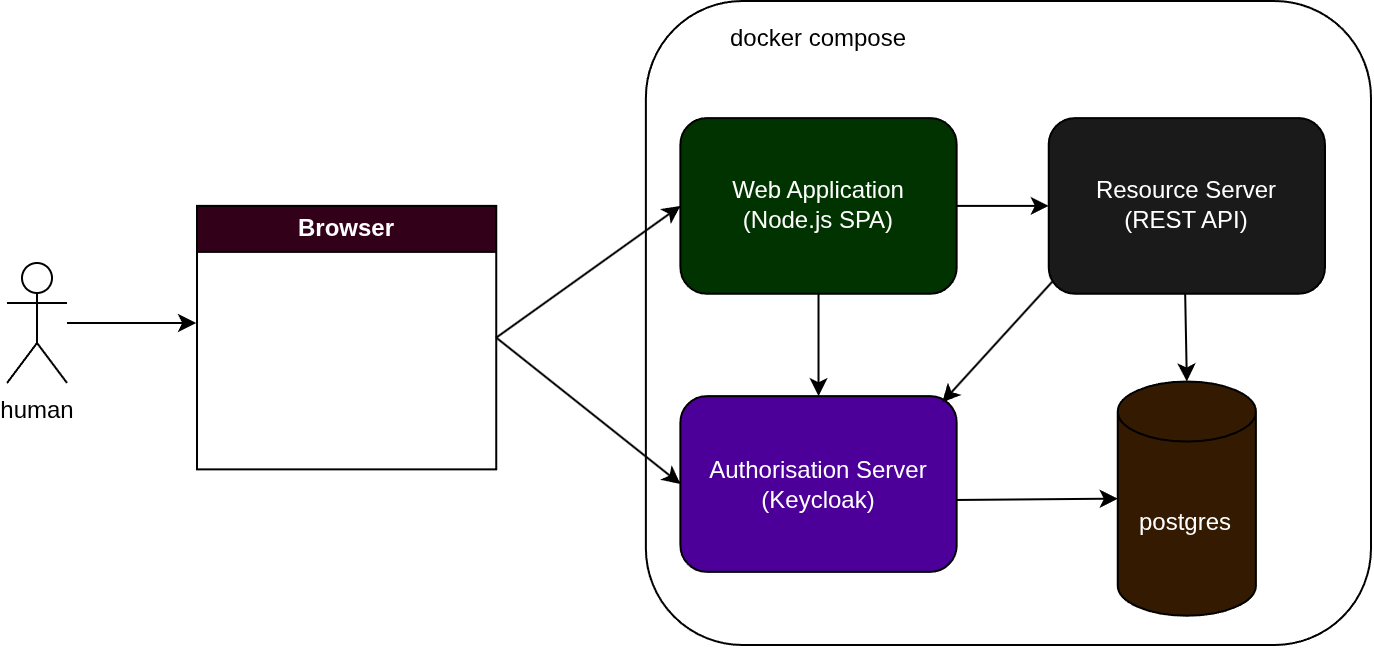
I want to follow the logs to trace the flow of this:
- User goes to the
Web Applicationlanding page and clicks theLoginbutton - returning a login page - User enters their username and password, clicks
Submit- returning the home page - User clicks
My Orderson the returned home page (theProtected Resource) - returning the users order page
Having already done this, here is what the sequence diagram looks like:
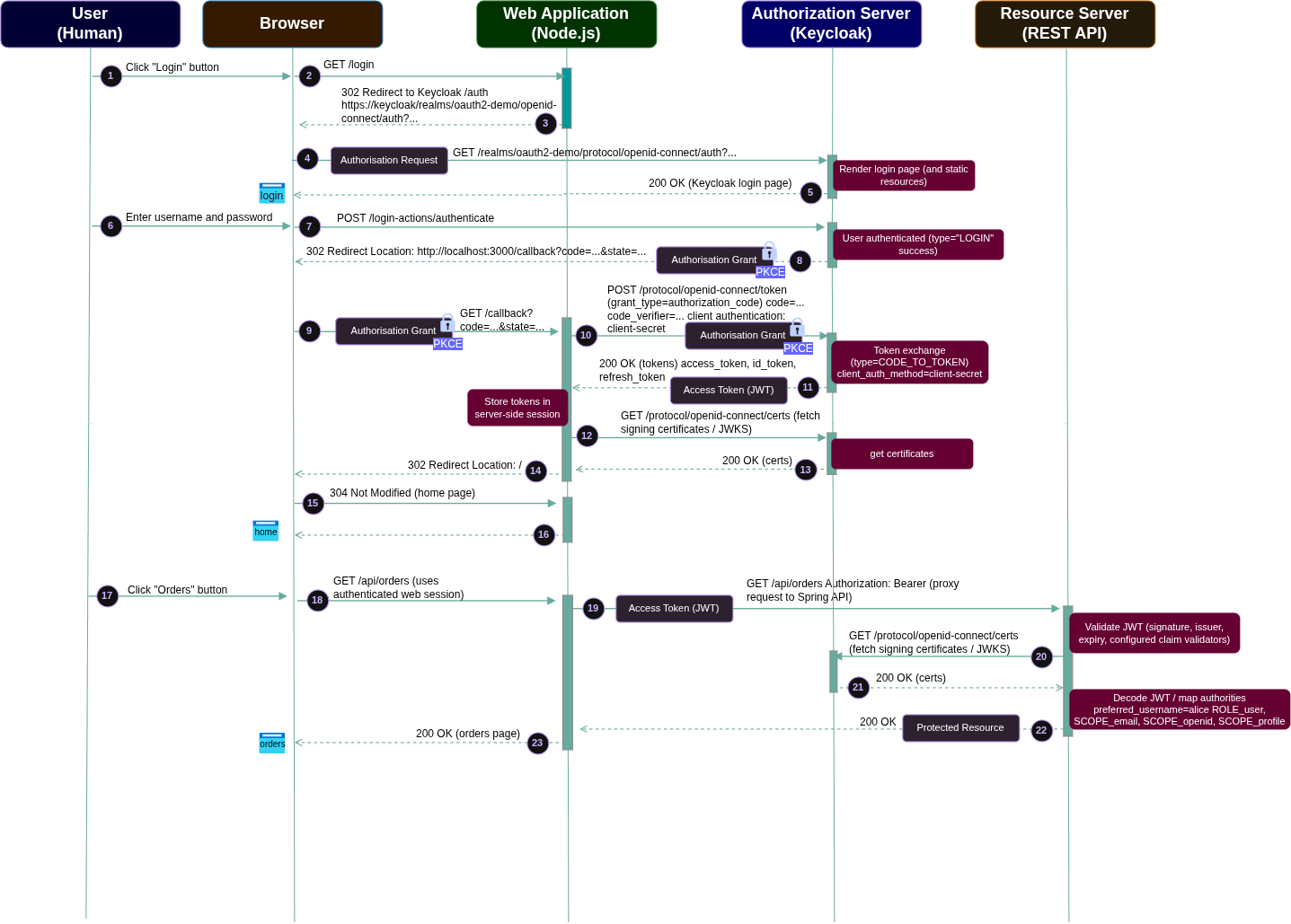
I want to map the stages of this sequence diagram to the logs captured from the Web Application, Keycloak, and Spring API. If you want to follow along:
docker compose up --build
Walkthrough
(1) User clicks “Login”
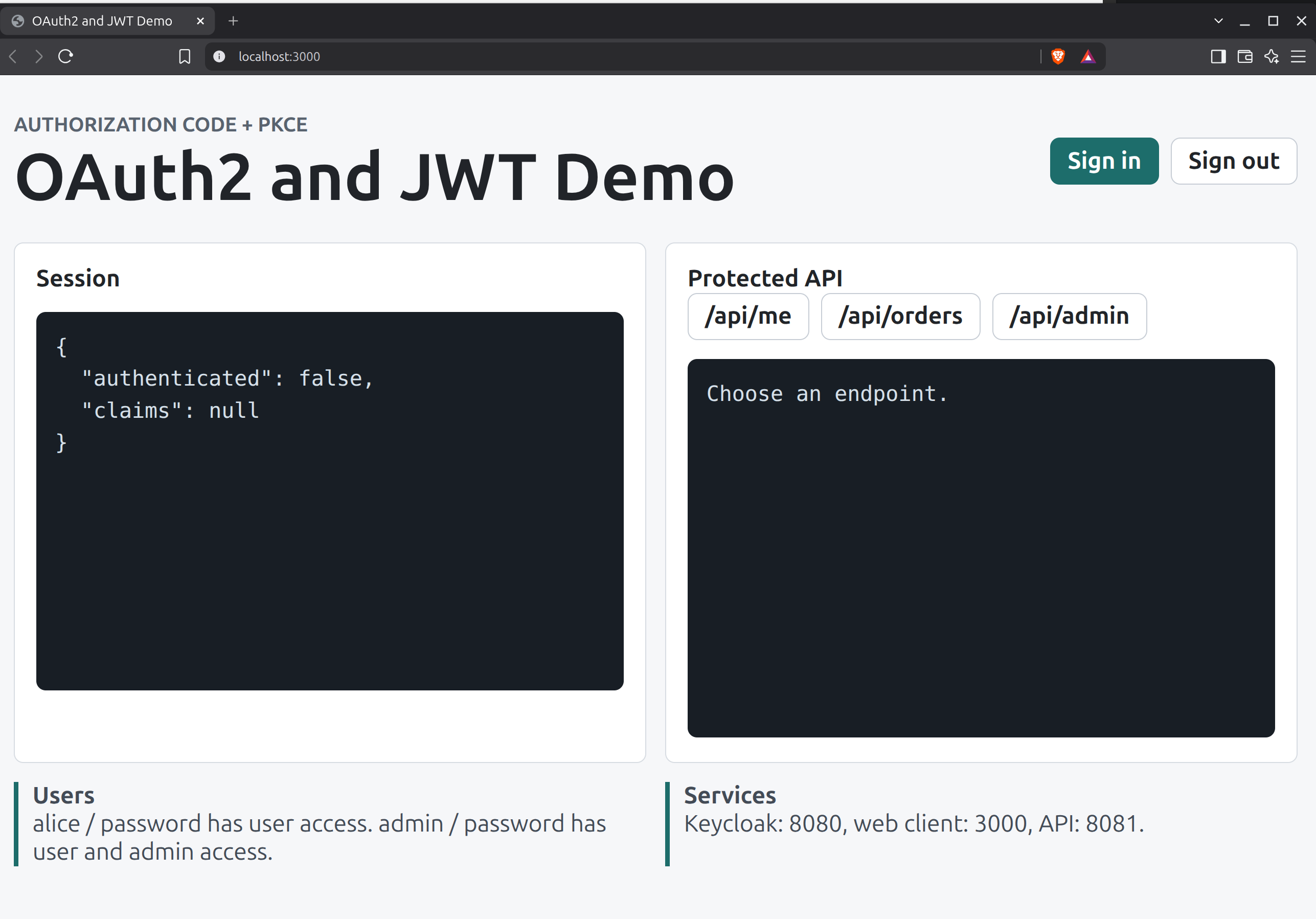
The un-authenticated user goes to the landing page and clicks the Sign in button:
(2) Browser → Web Application: GET /login
The browser asks the Web Appplication to begin the login process.
web-1 | {"event":"request_started","requestId":"8c500581-f702-4c44-8b45-d47a712a1f9b","method":"GET","path":"/login","authenticated":false,"principal":null}
The Web Application then records that it is starting the OAuth/OIDC login flow. It knows the callback URI and requested scopes:
web-1 | {"event":"login_started","requestId":"8c500581-f702-4c44-8b45-d47a712a1f9b","redirectUri":"http://localhost:3000/callback","scope":"openid profile email"}
The application also creates the OAuth authorization request. The later Keycloak request (5) confirms that this request contains state, nonce, a PKCE code_challenge, and code_challenge_method=S256.
(3) Web Application → Browser: 302 redirect to Keycloak
The Web Application does not display the username/password form itself. Instead, it responds to /login with an HTTP 302, instructing the browser to go to Keycloak.
web-1 | {"event":"request_completed","requestId":"8c500581-f702-4c44-8b45-d47a712a1f9b","method":"GET","path":"/login","status":302,"durationMs":12,"authenticated":false,"principal":null}
(4) Browser → Keycloak: Authorization Request
The browser follows the redirect and calls Keycloak’s OpenID Connect authorization endpoint.
This log line is particularly useful because it exposes the important OAuth/OIDC request parameters, including:
client_id=web-clientscope=openid profile emailresponse_type=coderedirect_uri=http://localhost:3000/callbackstate=fwiljQUGFYmOfqyQ2HNQKsxtKATfMeQOpWAPRqjGIIcnonce=vf-_DRVL9tnc3V4fJHxE_EQqDc3Xz01CF954_6cJTMkcode_challenge=tMtnSM6RJWYja2oky2yqUbWnH5K6p0jicp_PakElseIcode_challenge_method=S256
The presence of response_type=code shows that this is the Authorization Code flow. The code_challenge and code_challenge_method=S256 parameters show that PKCE is being used.
keycloak-1 | 2026-08-11 19:34:14,667 INFO [io.quarkus.http.access-log] (executor-thread-1) 172.18.0.1 - - [11/Aug/2026:19:34:14 +0000] "GET /realms/oauth2-demo/protocol/openid-connect/auth?client_id=web-client&scope=openid%20profile%20email&response_type=code&redirect_uri=http%3A%2F%2Flocalhost%3A3000%2Fcallback&state=fwiljQUGFYmOfqyQ2HNQKsxtKATfMeQOpWAPRqjGIIc&nonce=vf-_DRVL9tnc3V4fJHxE_EQqDc3Xz01CF954_6cJTMk&code_challenge=tMtnSM6RJWYja2oky2yqUbWnH5K6p0jicp_PakElseI&code_challenge_method=S256 HTTP/1.1" 200 6906
(5) — Keycloak → Browser: Keycloak login page
The authorization request returns HTTP 200, meaning Keycloak sent the login page to the browser.
keycloak-1 | 2026-08-11 19:34:14,667 INFO [io.quarkus.http.access-log] (executor-thread-1) 172.18.0.1 - - [11/Aug/2026:19:34:14 +0000] "GET /realms/oauth2-demo/protocol/openid-connect/auth?client_id=web-client&scope=openid%20profile%20email&response_type=code&redirect_uri=http%3A%2F%2Flocalhost%3A3000%2Fcallback&state=fwiljQUGFYmOfqyQ2HNQKsxtKATfMeQOpWAPRqjGIIc&nonce=vf-_DRVL9tnc3V4fJHxE_EQqDc3Xz01CF954_6cJTMk&code_challenge=tMtnSM6RJWYja2oky2yqUbWnH5K6p0jicp_PakElseI&code_challenge_method=S256 HTTP/1.1" 200 6906
The browser then loads Keycloak’s supporting JavaScript and CSS. For example:
keycloak-1  | 2026-08-11 19:34:14,703 INFO  [io.quarkus.http.access-log] (executor-thread-5) 172.18.0.1 - - [11/Aug/2026:19:34:14 +0000] "GET /resources/sfv2l/login/keycloak.v2/js/authChecker.js HTTP/1.1" 200 2369
keycloak-1  | 2026-08-11 19:34:14,703 INFO  [io.quarkus.http.access-log] (executor-thread-3) 172.18.0.1 - - [11/Aug/2026:19:34:14 +0000] "GET /resources/sfv2l/login/keycloak.v2/css/styles.css HTTP/1.1" 200 3014
keycloak-1  | 2026-08-11 19:34:14,703 INFO  [io.quarkus.http.access-log] (executor-thread-4) 172.18.0.1 - - [11/Aug/2026:19:34:14 +0000] "GET /resources/sfv2l/login/keycloak.v2/js/passwordVisibility.js HTTP/1.1" 200 698
The Keycloak login page is displayed to the user.
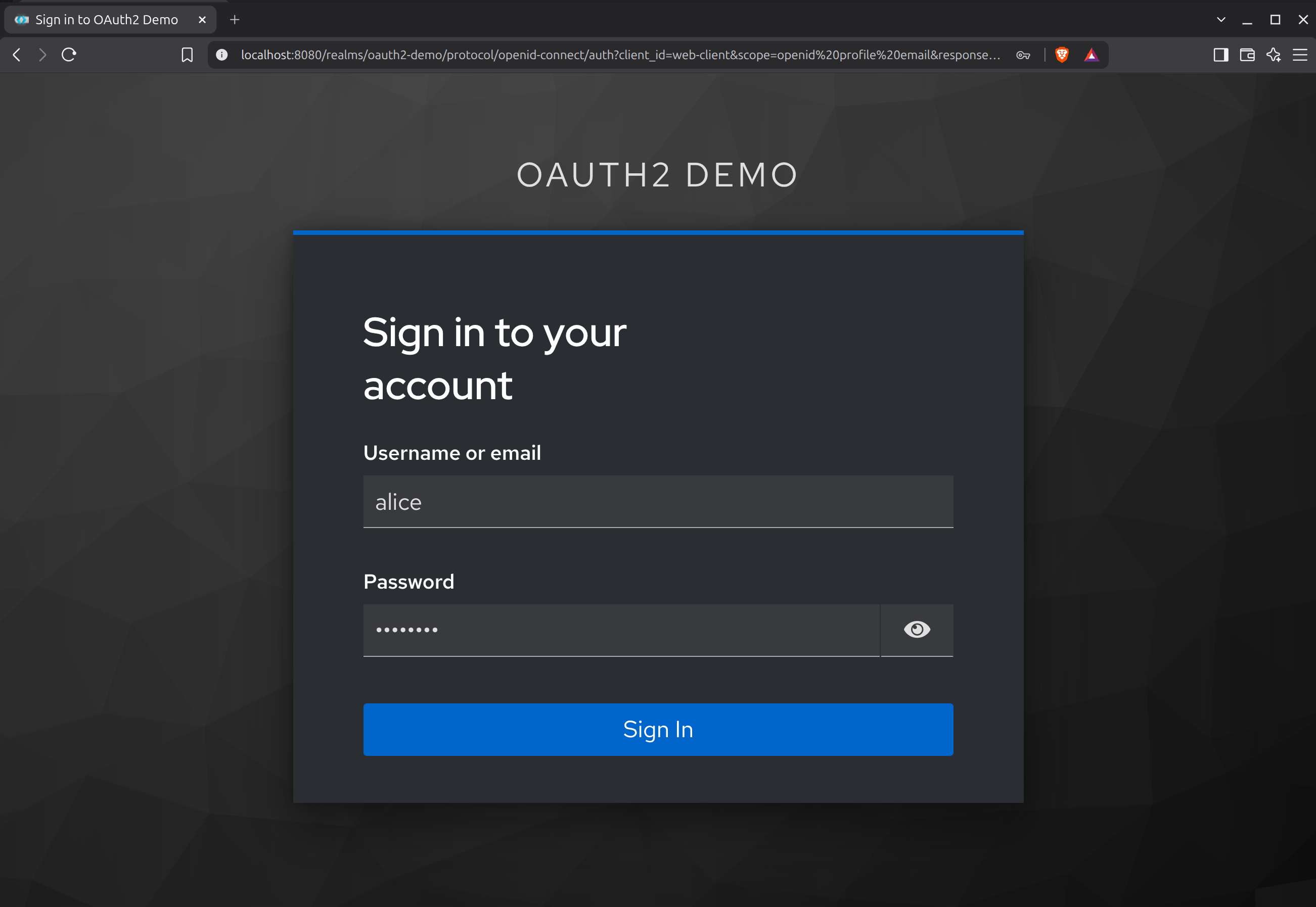
(6) — User enters username and password
The user types their username and password into the Keycloak login page displayed by the browser, and clicks Submit.
(7) Browser → Keycloak: Submit credentials
The browser submits the login form to Keycloak’s authentication endpoint. And Keycloak logs a successful login for alice:
keycloak-1 | 2026-08-11 19:34:22,431 DEBUG [org.keycloak.events] (executor-thread-1) type="LOGIN", realmId="94107831-a88c-4e54-9ded-b9e0a22350f7", realmName="oauth2-demo", clientId="web-client", userId="4622b398-6079-4930-b21c-b20705057173", sessionId="242a51f2-e130-4ce5-aa38-7578a9491481", ipAddress="172.18.0.1", auth_method="openid-connect", auth_type="code", response_type="code", redirect_uri="http://localhost:3000/callback", consent="no_consent_required", code_id="242a51f2-e130-4ce5-aa38-7578a9491481", username="alice", response_mode="query", authSessionParentId="242a51f2-e130-4ce5-aa38-7578a9491481", authSessionTabId="q-KZB6MiGqU"
keycloak-1 | 2026-08-11 19:34:22,474 INFO [io.quarkus.http.access-log] (executor-thread-1) 172.18.0.1 - - [11/Aug/2026:19:34:22 +0000] "POST /realms/oauth2-demo/login-actions/authenticate?session_code=QMFqZAkFFfQ2Oig0yIBbqpK_FKltGLKb2ljqlyE3_Ho&execution=da142f5d-e8ae-4d5e-8893-0abf34f9ea63&client_id=web-client&tab_id=q-KZB6MiGqU&client_data=eyJydSI6Imh0dHA6Ly9sb2NhbGhvc3Q6MzAwMC9jYWxsYmFjayIsInJ0IjoiY29kZSIsInN0IjoiZndpbGpRVUdGWW1PZnF5UTJITlFLc3h0S0FUZk1lUU9wV0FQUnFqR0lJYyJ9 HTTP/1.1" 302 -
The type="LOGIN" entry confirms successful authentication. The HTTP request returning 302 tells us that Keycloak is now redirecting the browser onwards.
(8) Keycloak → Browser: redirect to the callback URI (Authorisation Grant)
After successful authentication, Keycloak redirects the browser back to the Web Application using Proof Key for Code Exchange (PKCE):
PKCE works by having the client generate a random secret called a code verifier, then derive a code challenge from it. The code challenge is sent with the authorization request, and the original verifier is sent when exchanging the code for a token. This ensures only the client that started the flow can complete it. OAuth Docs (https://oauth.net/2/pkce/)
The successful authentication POST completes with HTTP 302:
keycloak-1 | 2026-08-11 19:34:22,474 INFO [io.quarkus.http.access-log] (executor-thread-1) 172.18.0.1 - - [11/Aug/2026:19:34:22 +0000] "POST /realms/oauth2-demo/login-actions/authenticate?session_code=QMFqZAkFFfQ2Oig0yIBbqpK_FKltGLKb2ljqlyE3_Ho&execution=da142f5d-e8ae-4d5e-8893-0abf34f9ea63&client_id=web-client&tab_id=q-KZB6MiGqU&client_data=eyJydSI6Imh0dHA6Ly9sb2NhbGhvc3Q6MzAwMC9jYWxsYmFjayIsInJ0IjoiY29kZSIsInN0IjoiZndpbGpRVUdGWW1PZnF5UTJITlFLc3h0S0FUZk1lUU9wV0FQUnFqR0lJYyJ9 HTTP/1.1" 302 -
(9) Browser → Web Application: GET /callback
The browser returns to the Web Application’s callback endpoint.
At the start of this request, the Web Application still reports the request as unauthenticated because the authorization code has not yet been exchanged for a token.
web-1 | {"event":"request_started","requestId":"e52823d6-3b0a-457c-8792-2bd0fd917016","method":"GET","path":"/callback","authenticated":false,"principal":null}
(10) Web Application → Keycloak: exchange authorization code for tokens
The Web Application now exchanges the authorization code for tokens at Keycloak’s token endpoint.
Keycloak records the OAuth event:
keycloak-1 | 2026-08-11 19:34:22,550 DEBUG [org.keycloak.events] (executor-thread-1) type="CODE_TO_TOKEN", realmId="94107831-a88c-4e54-9ded-b9e0a22350f7", realmName="oauth2-demo", clientId="web-client", userId="4622b398-6079-4930-b21c-b20705057173", sessionId="242a51f2-e130-4ce5-aa38-7578a9491481", ipAddress="172.18.0.5", token_id="onrtac:581284e9-dfb6-4df8-9c21-fb259167fb4d", grant_type="authorization_code", refresh_token_type="Refresh", scope="openid profile email", refresh_token_id="2c97ccc6-fe5c-45d7-8dfb-a838526961a5", code_id="242a51f2-e130-4ce5-aa38-7578a9491481", client_auth_method="client-secret"
The CODE_TO_TOKEN event shows that:
- the grant is
authorization_code; - the client is
web-client; - the requested scope is
openid profile email; - the Web Application authenticates as a confidential client using
client-secret.
The logs do not print the code_verifier, so the PKCE verifier itself cannot be demonstrated directly from this token-endpoint log. However, stage (4) proves that the authorization request was initiated with a PKCE code_challenge and code_challenge_method=S256.
(11) Keycloak → Web Application: token response
The token endpoint returns HTTP 200:
keycloak-1 | 2026-08-11 19:34:22,553 INFO [io.quarkus.http.access-log] (executor-thread-1) 172.18.0.5 - - [11/Aug/2026:19:34:22 +0000] "POST /realms/oauth2-demo/protocol/openid-connect/token HTTP/1.1" 200 3260
Together with the successful CODE_TO_TOKEN event, this shows that Keycloak successfully exchanged the authorization code for tokens.
A JWT token is returned ot the Web Application and stored in the server-side session.
(12) Web Application → Keycloak: fetch signing certificates / JWKS
Immediately after the token response, the Web Application requests Keycloak’s certificates:
keycloak-1 | 2026-08-11 19:34:22,568 INFO [io.quarkus.http.access-log] (executor-thread-1) 172.18.0.5 - - [11/Aug/2026:19:34:22 +0000] "GET /realms/oauth2-demo/protocol/openid-connect/certs HTTP/1.1" 200 2941
This is the certificate/JWKS interaction shown in the diagram.
These public signing keys can be used to validate JWT signatures.
After the token exchange and certificate lookup, the Web Application records that login has completed successfully:
web-1 | {"event":"login_completed","requestId":"e52823d6-3b0a-457c-8792-2bd0fd917016","authenticated":true,"principal":"alice","expiresAt":1786477162}
(13) Web Application → Browser: finish callback with 302
The same /callback request that began in stage (9) now completes.
The user is now authenticated as alice and returns HTTP 302:
web-1 | {"event":"request_completed","requestId":"e52823d6-3b0a-457c-8792-2bd0fd917016","method":"GET","path":"/callback","status":302,"durationMs":92,"authenticated":true,"principal":"alice"}
This is the Web Application redirecting the browser away from /callback after successfully completing login.
(14) Browser → Web Application: GET /
The browser follows the redirect and requests the application’s home page:
web-1 | {"event":"request_started","requestId":"64b082f1-780c-40bb-a0f5-b5c9756cc251","method":"GET","path":"/","authenticated":true,"principal":"alice"}
The key difference from stage (2) is that the Web Application now sees the request as authenticated and identifies the principal as alice.
(15) Web Application → Browser: redirect to home page
In this particular run, the browser already had the page cached, so the Web Application returned HTTP 304 Not Modified:
web-1 | {"event":"request_completed","requestId":"64b082f1-780c-40bb-a0f5-b5c9756cc251","method":"GET","path":"/","status":304,"durationMs":2,"authenticated":true,"principal":"alice"}
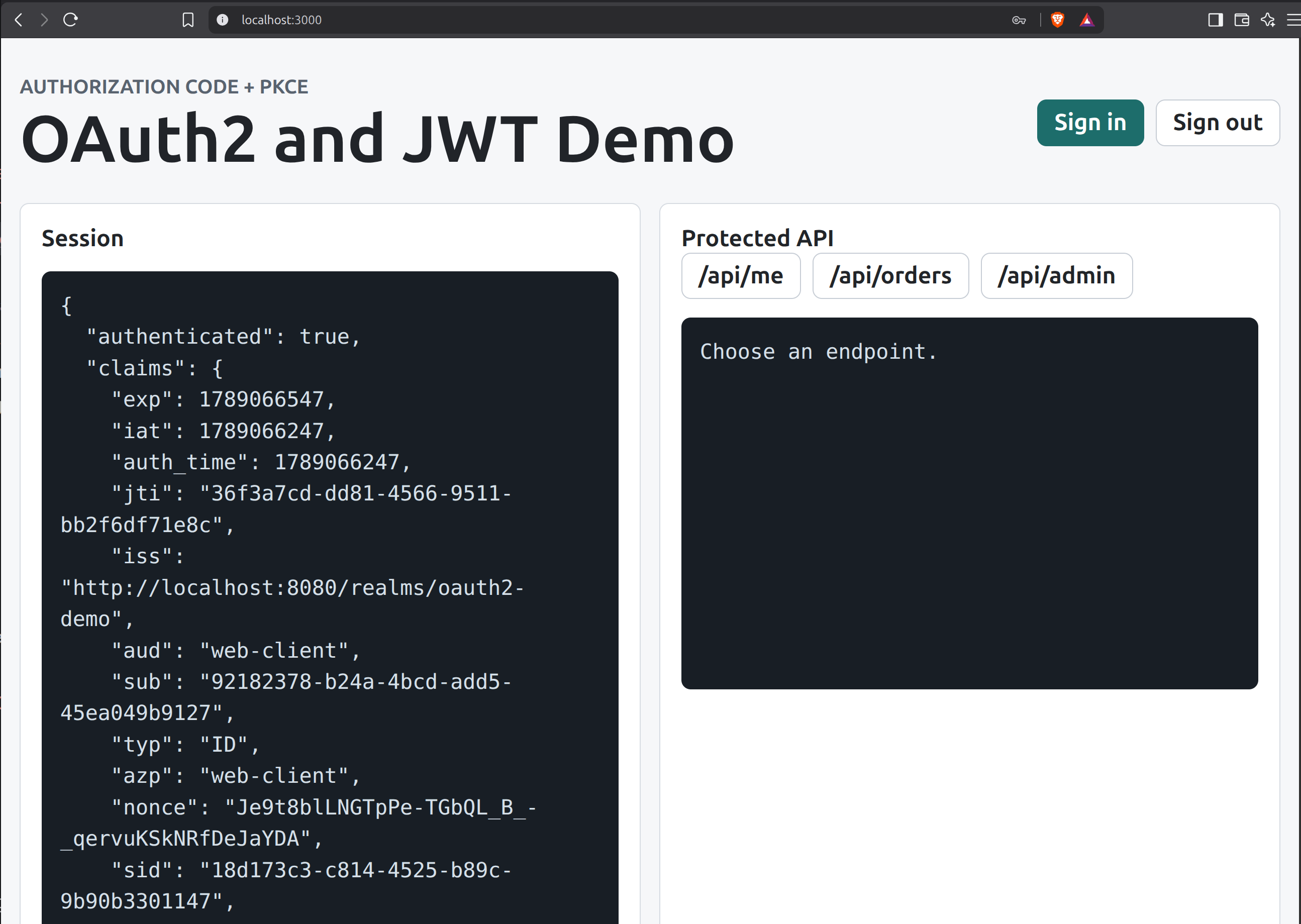
(16) Web Application → Browser: home page
The Web Application returns the home page to the browser:
(17) User clicks “Orders”
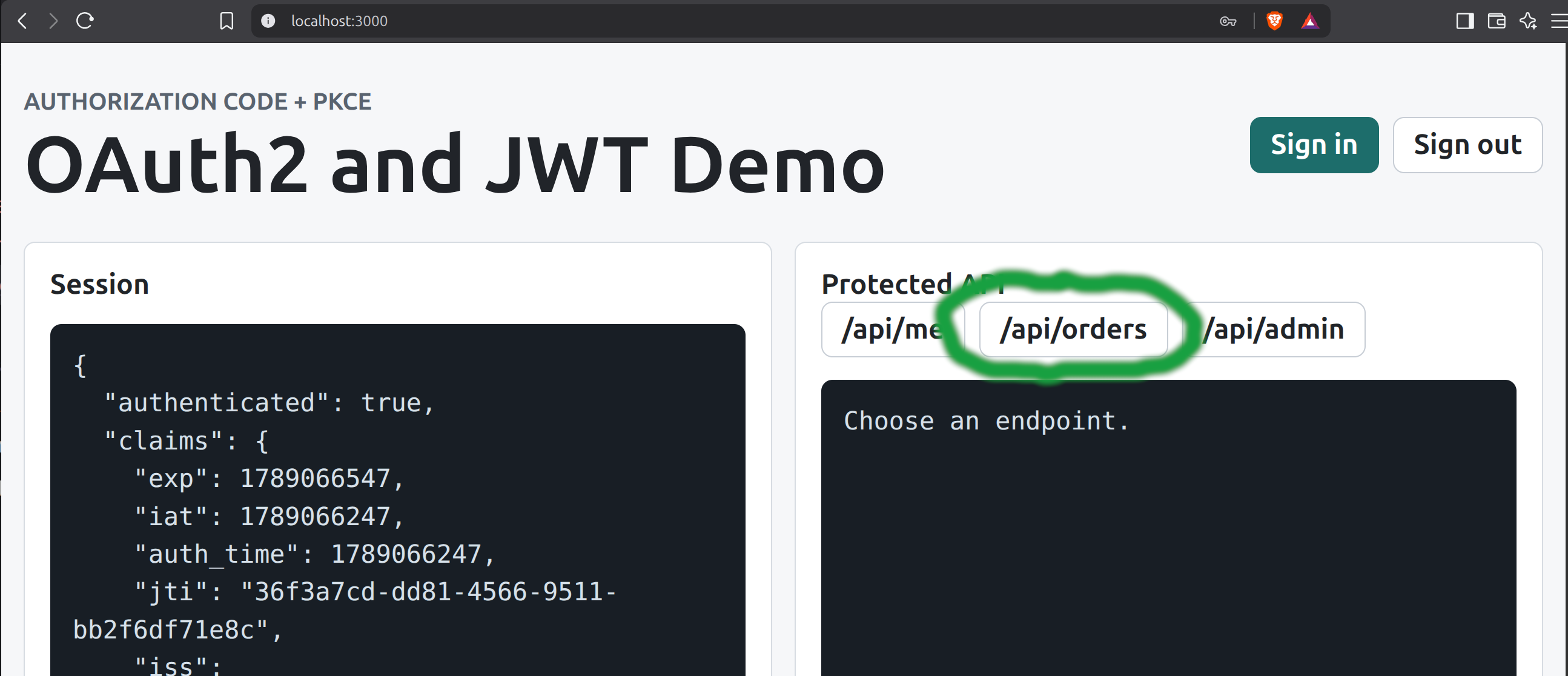
The user now triggers an application action that requires protected API data by clicking on Orders:
(18) Browser → Web Application: GET /api/orders
The browser then calls the Web Application:
web-1 | {"event":"request_started","requestId":"07f8eaf5-833b-4f58-a934-1b7e4852b816","method":"GET","path":"/api/orders","authenticated":true,"principal":"alice"}
The Web Application recognises alice through its authenticated web session. The Web Application begins proxying the protected request upstream:
web-1 | {"event":"api_proxy_started","requestId":"07f8eaf5-833b-4f58-a934-1b7e4852b816","resource":"orders","principal":"alice"}
(19) Web Application → Spring API: GET /api/orders with bearer token
The Web Application retrieves the access token associated with alice’s server-side session and sends it to the Spring API.
The Spring API receives:
api-1 | 2026-08-11T19:34:26.570Z INFO 1 --- [oauth2-demo] [nio-8081-exec-8] ecurityConfig$OAuth2RequestLoggingFilter : oauth2 step=request_received method=GET path=/api/orders bearer_token_present=true
(20/21) Spring API → Keycloak: fetch signing certificates / JWKS
Before the API logs the decoded JWT, the Spring API requests Keycloak certificates:
keycloak-1 | 2026-08-11 19:34:26,654 INFO [io.quarkus.http.access-log] (executor-thread-1) 172.18.0.4 - - [11/Aug/2026:19:34:26 +0000] "GET /realms/oauth2-demo/protocol/openid-connect/certs HTTP/1.1" 200 2941
These certificates allow the Resource Server to verify JWT signatures.
After receiving the bearer token and fetching Keycloak’s certificates, the Spring API records:
api-1 | 2026-08-11T19:34:26.704Z INFO 1 --- [oauth2-demo] [nio-8081-exec-8] uk.bit1.oauth2demo.SecurityConfig : oauth2 step=jwt_decoded subject=4622b398-6079-4930-b21c-b20705057173 preferred_username=alice issuer=http://localhost:8080/realms/oauth2-demo expires_at=2026-08-11T19:39:22Z authorities=[ROLE_user, SCOPE_email, SCOPE_openid, SCOPE_profile]
This line shows that Spring has successfully decoded the JWT and extracted important claims:
subject=4622b398-6079-4930-b21c-b20705057173preferred_username=aliceissuer=http://localhost:8080/realms/oauth2-demoexpires_at=2026-08-11T19:39:22Z
It has also mapped token roles/scopes into Spring Security authorities:
ROLE_userSCOPE_emailSCOPE_openidSCOPE_profile
The log represents this as one jwt_decoded event. The internal signature and configured-claim validation happens as part of Spring Security’s JWT processing before the request can be treated as authenticated.
The API request completes successfully:
api-1 | 2026-08-11T19:34:26.727Z INFO 1 --- [oauth2-demo] [nio-8081-exec-8] ecurityConfig$OAuth2RequestLoggingFilter : oauth2 step=request_completed path=/api/orders status=200 authentication=authenticated principal=alice authorities=[ROLE_user, SCOPE_email, SCOPE_openid, SCOPE_profile]
(22) Spring API → Web Application: 200 OK
The Web Application records that the upstream Spring API request completed successfully:
web-1 | {"event":"api_proxy_completed","requestId":"07f8eaf5-833b-4f58-a934-1b7e4852b816","resource":"orders","upstreamStatus":200,"contentType":"application/json","principal":"alice"}
(23) Web Application → Browser: 200 OK
The browser’s original /api/orders request now completes:
web-1 | {"event":"request_completed","requestId":"07f8eaf5-833b-4f58-a934-1b7e4852b816","method":"GET","path":"/api/orders","status":200,"durationMs":217,"authenticated":true,"principal":"alice"}
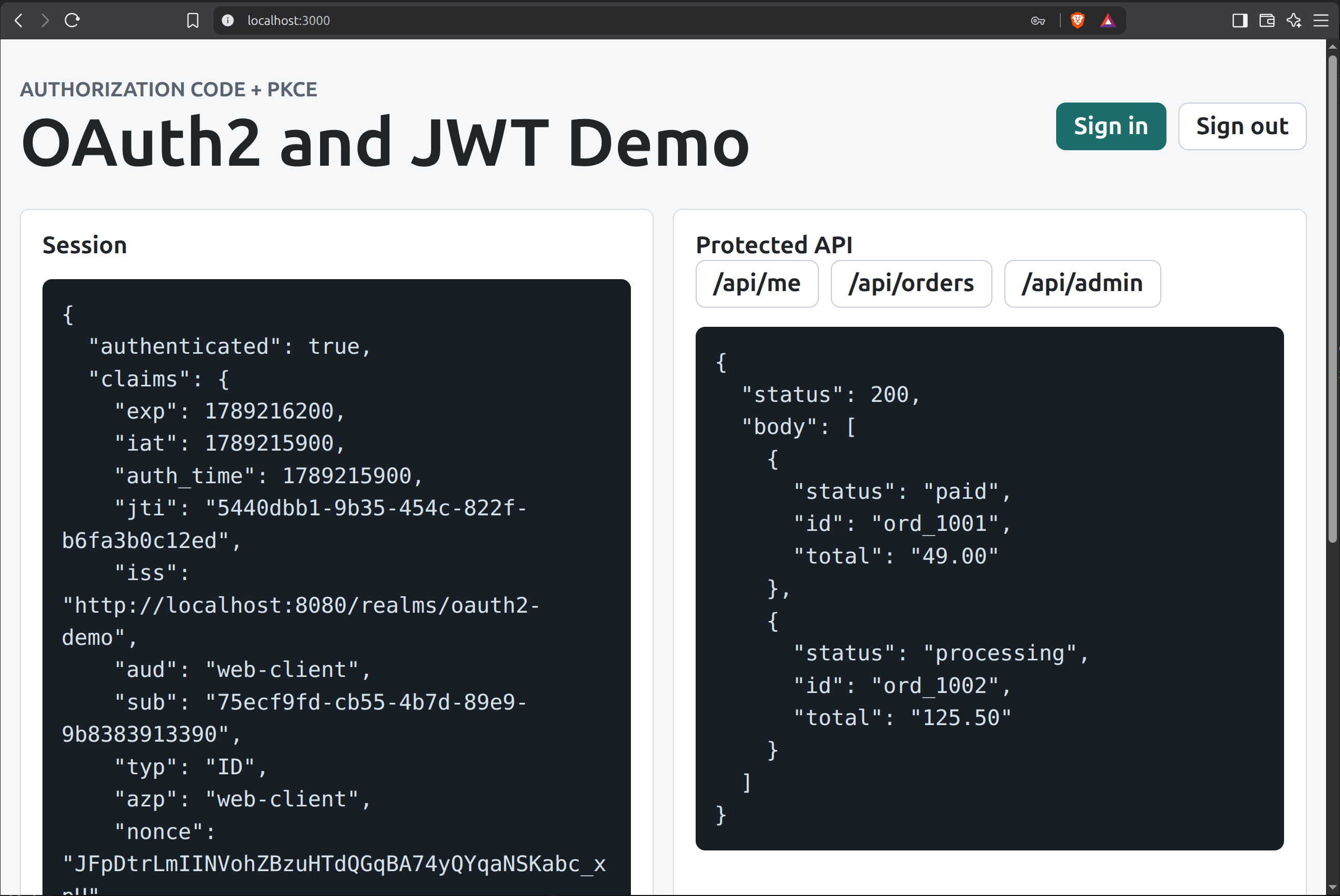
This closes the HTTP request that began when the browser requested /api/orders.
The browser receives the result without ever needing direct access to the OAuth access token.
Conclusion
If you have made it this far, well done! I hope its provided some insight into what happens when we use a username/password to log into a SPA and request a Protected Resource from a Resource Server.